
A social proof widget for Shopify is one of the fastest conversion rate levers available to any ecommerce store, because it works on the exact moment most stores ignore — the 30 seconds after a visitor lands on a product page and has not yet decided to buy.
Real-time purchase notifications and live visitor counters reduce that hesitation window by showing the one thing most marketing copy cannot: that other people are actively choosing this product right now.
According to provesrc.com’s 2026 social proof data, real-time purchase notifications can increase conversions by 10 to 15 percent on average, with high-intent product pages seeing lifts as high as 32 percent. The average Shopify store converts at 1.4 percent according to blendcommerce.com’s 2026 benchmarks. A 15 percent lift on a 1.4 percent conversion rate is not a rounding error — it is 0.21 additional conversions per 100 visitors, compounding across every product page on your store, every day.
EaseNotify has added a social proof widget to its notification suite. This guide covers how both widget types — recent sales notifications and live visitor counters — work, the psychology behind them, and how to deploy them correctly across a Shopify store.
Key Takeaways
- Social proof widgets work because of a cognitive shortcut called social validation. When buyers see that other people have already purchased or are currently viewing a product, their risk assessment shifts. The decision moves from “should I buy this?” to “I need to decide before it’s gone.”
- Recent sales notifications convert at 10-32% better on product pages according to provesrc.com. The lift is highest on high-consideration products where buyer hesitation is the primary conversion barrier.
- Live visitor counters reduce bounce rates by up to 21%. Showing “47 people viewing this right now” creates genuine urgency without requiring a sale, a timer, or a discount.
- Placement matters as much as the message. Bottom-left toast notifications that appear after 5 to 8 seconds consistently outperform immediately-appearing overlays and mid-page placements.
- Social proof works best when combined with urgency messaging. A recent sales notification on the product page paired with a countdown timer or a free shipping bar targets two conversion barriers at once — social hesitation and price hesitation.
Why Shoppers Hesitate (And What Social Proof Fixes)
Before understanding how a social proof widget works, it helps to understand what it is solving. Most ecommerce conversion frameworks focus on the top of the funnel — ads, landing pages, product photography. The conversion gap that social proof addresses is further down: the moment a visitor has landed on a product page, seen the price, and stalled.
That stall is called conversion anxiety. It comes from several sources:
| Conversion Anxiety Source | What the Visitor Is Thinking | Social Proof Response |
|---|---|---|
| Risk anxiety | “What if this product is bad?” | Recent reviews, purchase count |
| Decision anxiety | “Is this the right choice for me?” | Real buyer names and locations |
| Scarcity blindness | “I can come back later” | Live visitor count, low stock alerts |
| Price hesitation | “Is this worth it?” | Volume of purchases, trust signals |
| FOMO | “Am I missing something others know?” | Real-time purchase activity |
A social proof widget addresses the bottom three of these five directly. It does not require a discount, a popup, or an email capture. It works by making previously invisible activity visible — showing a hesitant buyer that the choice they are considering is one that other people are making right now.
This is Robert Cialdini’s principle of social validation applied in real time. In his foundational research on influence, Cialdini established that people look to the behavior of others when making uncertain decisions. The more uncertain the buyer, the more powerful the social signal. For a first-time visitor to your Shopify store who does not know your brand, seeing “34 purchases in the last 24 hours” is a more persuasive signal than your best product copy.
What Is a Social Proof Widget?
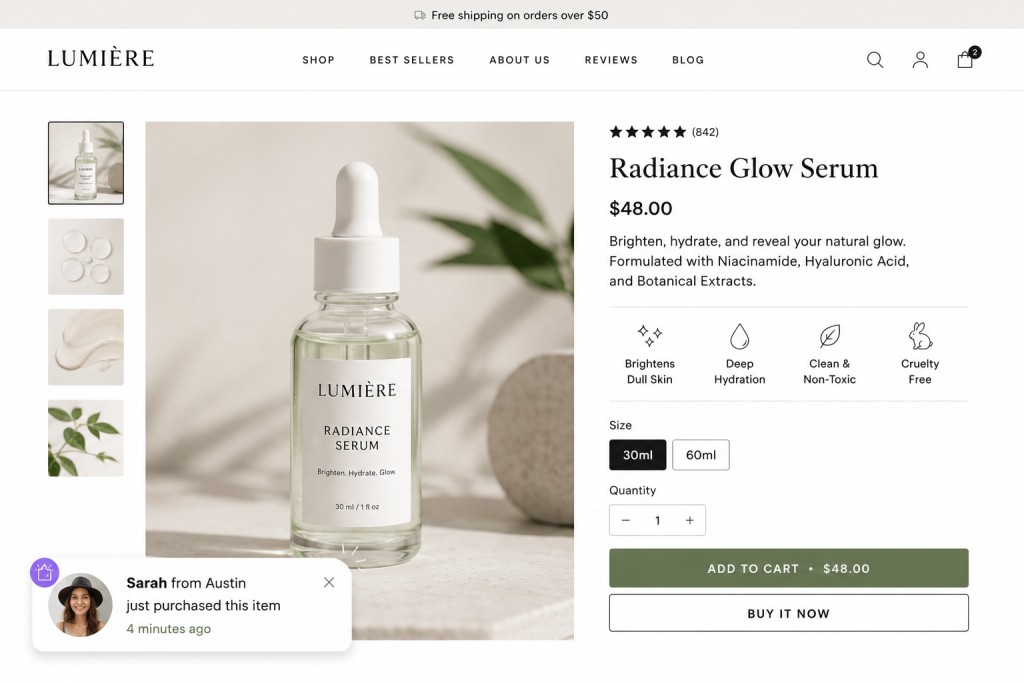
A social proof widget is a small, non-interruptive notification that appears on your website — typically in the bottom-left corner as a toast-style popup — displaying real customer activity. Unlike a popup that demands attention and blocks content, a social proof notification appears passively, delivers a message in 3 to 5 seconds, and disappears without requiring interaction.
There are two types of social proof widgets in EaseNotify’s suite:
1. Recent Sales Notifications Show real purchase activity from your connected store platforms (Shopify, WooCommerce, and others). Example: “James from London just purchased this — 12 minutes ago.” Pulls live order data and rotates through recent transactions.
2. Live Visitor Counter Shows how many people are currently viewing a page in real time. Example: “31 people are viewing this product right now.” Rebuilds the feeling of a busy store floor for an online browsing experience.
Both widgets are distinct from announcement bars and popup alternatives. They do not sit at the top of the page, do not block content, and do not require a dismiss action. They are the quietest, least intrusive conversion tool available — which is precisely why they work where aggressive popups create friction.
Widget Type 1: Recent Sales Notifications
A recent sales notification is the social proof equivalent of a busy restaurant. When you walk past a restaurant with every table full, you assume the food is good. When you see a product page that quietly shows “Emma from Manchester purchased this 8 minutes ago,” you apply the same logic.
Why it works:
The notification delivers three signals simultaneously:
- Real people are buying this (social validation)
- They bought it recently (recency signals relevance)
- They are from a real place (geographic specificity increases trust)
According to socialproofy.io’s purchase notification research, ecommerce stores see the highest conversion lift from recent sales notifications on product pages where the visitor has been browsing for more than 15 seconds without adding to cart. This is the exact hesitation window the widget is built to close.
What makes a good recent sales notification:
- First name and location (not full name — privacy matters)
- Product name or category (not a generic “someone bought something”)
- Time since purchase (4 minutes ago beats “recently”)
- Clean, minimal design that does not compete with the product page
What kills it:
- Fake data. Visitors can tell when notifications cycle through identical names in the same order every time. EaseNotify pulls live order data from your connected platforms, so every notification reflects a real transaction.
- Showing it on the homepage. Recent sales notifications work on product and collection pages where purchase intent exists. On the homepage, they are context-free and ignored.
Widget Type 2: Live Visitor Counter
A live visitor counter shows the number of people currently viewing a specific page. It creates urgency through competition — not artificial scarcity, but the genuine signal that other shoppers are evaluating the same product right now.
Why it works:
The live visitor counter triggers what behavioral economists call “competitive arousal.” When a buyer knows others are considering the same item, their own desire to acquire it increases. This is the same mechanism that drives bidding on auction platforms — the presence of other buyers makes the item feel more valuable.
According to provesrc.com’s notification data, live visitor counters reduce bounce rates by up to 21 percent on product pages. Visitors who see the counter are measurably more likely to stay on the page long enough to make a purchase decision.
When to use it:
The live visitor counter is most effective on:
- High-demand product pages during sales events
- Limited inventory items
- New product launches where social validation is not yet available through reviews
A store with consistent traffic will naturally generate meaningful visitor counts. A low-traffic store showing “2 people viewing this” has the opposite effect — the small number signals low demand rather than urgency. If your product pages average fewer than 15 concurrent visitors during normal hours, the live visitor counter is better reserved for sale periods and campaign days when traffic spikes.
The 5 Proven Ways to Use Social Proof Widgets on Shopify
Way 1: Show Recent Sales on Product Pages Only
Target your recent sales notification exclusively to product pages using page targeting. Showing purchase notifications on the homepage or blog pages where visitors have no product context creates noise, not conversion lift. The notification needs a buying frame — a visitor who is already looking at a specific product needs social validation about that product, not about your store generally.
Setup: Set your page targeting rule to /products/ to restrict the widget to all product page URLs.
Way 2: Combine Visitor Counter with Sale Campaign Bars
During a sale, run your announcement bar with sale messaging at the top and the live visitor counter notification at the bottom-left simultaneously. The bar communicates the offer. The counter communicates demand. Together they create the two conditions that drive purchasing decisions fastest: a reason to buy now (the offer) and a reason not to wait (other people are looking).
This combination is measurably more effective than either element alone. Urgency marketing data consistently shows that purchase triggers stack — a visitor who sees both an expiring offer and real competitor interest makes faster decisions than a visitor who sees only one signal.
Way 3: Use Recent Sales on Cart Pages for Abandonment Prevention
Cart abandonment happens when buyers lose confidence at the last moment. Showing a recent sales notification on the cart page — “17 people purchased today” — restores the social validation that convinced them to add to cart in the first place. It is a reminder, not a new persuasion attempt.
Combine this with a free shipping bar or countdown timer on the cart page for maximum abandonment prevention. The three-signal stack (social proof + free shipping threshold + urgency timer) addresses all three forms of cart-stage anxiety simultaneously.
Way 4: Reserve the Visitor Counter for High-Traffic Periods
Set the live visitor counter to activate only when your real visitor count is above a meaningful threshold. Showing “3 people viewing this” on a slow Tuesday morning is not social proof — it is an admission of low traffic. Schedule the visitor counter for your peak traffic windows: evenings, weekends, and campaign days when genuine concurrent visitor numbers create real urgency.
EaseNotify’s Scheduling Widget lets you set exact time windows for each notification campaign without manual activation.
Way 5: Match Notification Frequency to Page Type
Set different notification frequency rules by page type. On product pages, a notification every 8 to 12 seconds creates a steady stream of social validation without feeling like spam. On the cart page, reduce frequency to once every 30 seconds — a buyer at checkout needs confidence, not interruption. Remember Dismissal ensures a visitor who has already closed a notification does not see it again on the same session.
Placement and Timing: Where and When to Show Social Proof
Social proof widget placement has measurable impact on conversion lift. The research consensus from provesrc.com points to three consistent findings:
| Placement Variable | Best Practice | Why |
|---|---|---|
| Position | Bottom-left corner | Does not compete with CTA buttons (typically bottom-right or center) |
| Timing | Appear after 5-8 seconds | Visitor has had time to read the page; notification feels contextual, not intrusive |
| Display duration | 5-6 seconds visible | Long enough to read, short enough not to annoy |
| Frequency | Every 10-15 seconds | Creates steady social signal without notification fatigue |
| Mobile | Bottom of viewport | Matches natural scroll behavior; does not block product images |
The 5 to 8 second delay before the first notification appears is the single most important timing variable. An immediate notification on page load is processed as an advertisement and ignored. A notification that appears after the visitor has already engaged with the product page content is processed as relevant information. The same message, shown at different moments, has a fundamentally different conversion impact.
How EaseNotify’s Social Proof Widget Works
EaseNotify’s social proof widget is a bottom-left toast notification that pulls live data from your connected store platforms — Shopify, WooCommerce, and others — to display real purchase activity and real visitor counts.
Recent sales notifications connect to your order data and rotate through recent purchases automatically. Each notification shows a first name, a location, the product or category, and the time since purchase. No manual data entry required after initial setup.
Live visitor counters pull real-time page view data and display it as a running count. The number updates in real time as visitors arrive and leave the page.
Both widget types run alongside EaseNotify’s existing announcement bars and countdown timers without script conflicts. Because EaseNotify’s page targeting applies to social proof widgets as well as bars, you can show a recent sales notification on product pages, a visitor counter only during sale events, and a free shipping bar sitewide — all from one dashboard, with no additional apps required.
This is the core difference between EaseNotify’s approach and standalone social proof tools like WiserNotify or ProveSource: you do not need a separate tool for social proof and a separate tool for announcement bars. Both conversion layers run from the same dashboard, with the same page targeting rules, on the same lightweight script.
Frequently Asked Questions (FAQs)
Q: What is a social proof widget for Shopify? A social proof widget for Shopify is a small, non-interruptive notification — typically appearing as a toast in the bottom-left corner — that displays real customer activity such as recent purchases or live visitor counts. It works by reducing buyer hesitation through social validation: showing a visitor that other people are actively choosing the same product. According to provesrc.com, social proof widgets increase conversions by 10 to 32 percent on product pages.
Q: Are recent sales notifications real or fake? EaseNotify’s recent sales notifications pull live order data from your connected Shopify, WooCommerce, or other store platform. Every notification reflects a real transaction from your actual order history. Fake or manually entered social proof data is both ethically problematic and ineffective — visitors can identify notification patterns that cycle through invented names, which destroys the trust the widget is designed to build.
Q: Will a social proof widget slow down my Shopify store? Not if it is implemented correctly. EaseNotify loads both its announcement bar and social proof widget from a single lightweight script, avoiding the cumulative load impact of installing a separate social proof app on top of an existing notification bar tool. For a full breakdown of how notification widgets affect Core Web Vitals, see our announcement bar page speed guide.
Q: Should I show the live visitor counter and recent sales notification at the same time? You can stack both widgets, but use page targeting rules to keep them contextually appropriate. On high-traffic product pages during sale events, showing both simultaneously creates a strong combined signal. On lower-traffic days, showing only recent sales notifications avoids the risk of low visitor counts undermining urgency. Set the visitor counter to scheduled activation during your peak traffic windows.
Q: What is the difference between a social proof widget and an announcement bar? An announcement bar sits persistently at the top or bottom of the page and broadcasts a message to every visitor. A social proof widget is a transient toast notification in the corner of the screen that delivers a specific, data-driven signal about real customer activity. They serve different conversion purposes: the announcement bar communicates your offer, the social proof widget validates the purchase decision. See our announcement bar vs popup guide for a full comparison of on-site notification formats.Q: How long does it take to see results from a social proof widget on Shopify? Most stores see measurable conversion changes within two to four weeks of consistent deployment. The lift is most visible on product pages with meaningful traffic — the widget needs real visitor volume to generate social proof data worth displaying. For a store doing fewer than 500 product page views per day, the effect will be slower to measure but is still present. Track add-to-cart rate and product page conversion rate in Shopify Analytics before and after activation for a clean measurement.Start your free EaseNotify plan at easenotify.com. The social proof widget — recent sales notifications and live visitor counter — is available alongside all announcement bar, countdown timer, and page targeting features in the same dashboard.
1 thought on “Social Proof Widget for Shopify: 5 Proven Ways to Turn Hesitant Shoppers into Buyers”