
Most “OptinMonster alternatives” posts hand you a list of eight logos and call it done. That is not useful, because the seven or eight tools people search for solve different problems, and OptinMonster itself is not bad software. It is a full-featured, powerful platform. The people searching this term are not asking “is OptinMonster good,” they are asking “why am I paying this much, or carrying this much page weight, for what I actually use.” This guide sorts alternatives by the actual reason stores switch, not by feature count.
Want a detailed head-to-head with full pricing and feature tables? See our EaseNotify vs OptinMonster comparison.
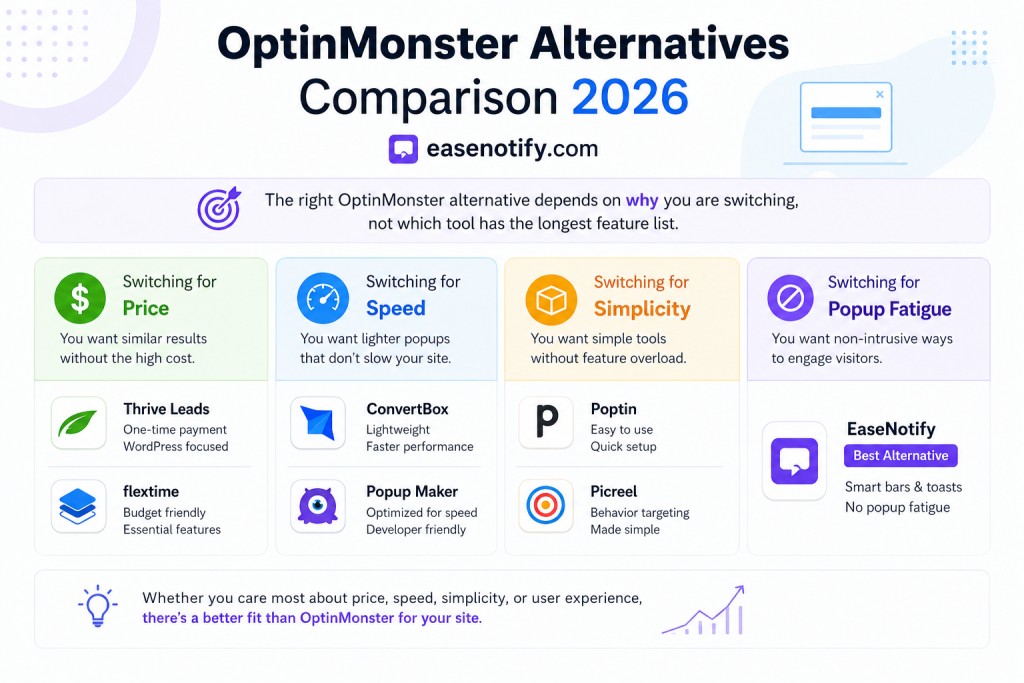
Key Takeaways
- Most stores that search “OptinMonster alternatives” are reacting to one of three things: price at scale, page speed impact, or an interface built for a bigger marketing team than they have
- There is no single best alternative. A store running heavy email flows needs different software than a store that just wants a clean announcement bar
- Lightweight announcement bar and notification tools like EaseNotify are not a direct feature-for-feature swap for OptinMonster, they solve the on-site messaging slice of the job at a fraction of the weight and cost
- If your actual complaint is popup fatigue rather than the tool itself, the fix may be format, not vendor, see our optinmonster alternatives for ecommerce guide before switching platforms entirely
- Check your existing popup and email integrations before switching. Migration friction is usually the real cost of “just switching tools”
Why People Actually Search for an OptinMonster Alternative
OptinMonster is built for marketing teams running serious lead-gen operations: A/B testing, deep segmentation, exit-intent campaigns tied into multiple email platforms. That depth is exactly why smaller stores start looking elsewhere. Three complaints show up consistently in reviews and community threads.
Price scaling. OptinMonster’s plans jump meaningfully once you move past the entry tier, and the entry tier caps pageviews low enough that a moderately trafficked store outgrows it within a few months.
Interface overhead. A full campaign builder with dozens of trigger conditions is powerful, but it is also a learning curve for a store owner who wants one banner live in five minutes, not a half-day campaign setup.
Feature mismatch. Nielsen Norman Group’s research on modal and popup patterns consistently finds that heavier interruption formats carry a real UX cost, and stores that only need a lightweight top-of-page message are paying popup-suite pricing for a feature they are not using.
None of these make OptinMonster a bad product. They make it a mismatched product for a specific store profile, which is exactly the profile this post is written for.
What to Check Before You Switch
Before comparing tools, get honest about which of these is your actual problem, since it determines which alternative even makes sense:
- Price at your traffic level. Pull your current OptinMonster bill and your current monthly pageviews. If the ratio feels wrong now, it gets worse as you grow, not better.
- What you are actually building. Full popup campaigns with A/B tests and segmentation, or a top bar announcing a sale? These are different tools solving different problems.
- Page speed impact. Run your site through PageSpeed Insights with and without your current popup script if you suspect it is a factor. A four-figure drop in performance score from a single widget script is a real signal, not a guess.
- Existing integrations. List every email platform, CRM, and analytics tool your current popups feed into. This is the actual migration cost, not the monthly subscription price.
7 OptinMonster Alternatives Compared
1. Privy
Built specifically for Shopify and ecommerce, with a strong free tier for smaller stores. Closest like-for-like popup and email capture replacement if your main use is exit-intent offers and email list growth. Less suited if you need advanced multi-step campaign logic.
2. Sumo
Broad free tier covering popups, social share, and basic email capture. Good starting point for very early-stage stores prioritizing zero cost over polish. Interface feels dated compared to newer tools, and support is limited on the free plan.
3. Justuno
Positioned as an enterprise-grade OptinMonster competitor with strong personalization and segmentation. Makes sense if your actual complaint about OptinMonster was insufficient depth, not too much. Pricing sits in a similar bracket to OptinMonster, so it does not solve a cost problem.
4. Wisepops
Popup and banner builder with a cleaner interface than most competitors in this category. Our dedicated Wisepops alternative comparison covers the reverse angle in more depth if you are evaluating Wisepops itself rather than switching away from it.
5. Poptin
Mid-tier popup builder with a generous free plan and straightforward campaign setup. A reasonable middle ground between Sumo’s simplicity and OptinMonster’s depth, without fully solving the page-weight concern since it is still a full popup engine.
6. Hello Bar
Announcement-bar-first tool, closer in spirit to a lightweight replacement than a popup suite. If your OptinMonster usage was mostly a top bar rather than modal campaigns, this is a more direct swap than most items on this list. See our Hello Bar alternatives post if Hello Bar itself is also feeling like more than you need.
7. EaseNotify
Not a popup suite replacement, and it should not be marketed as one. EaseNotify covers the announcement bar, banner, countdown timer, sales notification, and feedback form slice of on-site messaging, the exact set of features stores are actually using when their real complaint is “I only needed a top bar and I am paying for a campaign builder.” EaseNotify vs OptinMonster breaks down the direct feature and pricing comparison. Free plan available, Pro starts at $6 per month. If you need exit-intent modals with multi-step logic, this is not your tool. If you need a fast, light, no-code announcement bar or notification widget, it directly answers the page-speed and price complaints above.
Which Alternative Fits Your Store?
- Complaint is price at your traffic level, and you mostly run popups: Privy or Poptin
- Complaint is price, and you are pre-revenue or very early stage: Sumo
- Complaint is not enough depth or segmentation: Justuno
- Complaint is interface complexity for a simple use case: Wisepops or Hello Bar
- Complaint is page speed, cost, or you only ever used the top bar: EaseNotify
If none of these map cleanly and your real issue is that popups themselves feel intrusive regardless of vendor, the popup alternative for ecommerce guide covers non-popup formats worth considering before you evaluate another popup tool at all. Our Website Popup Guide 2026 also covers how to use popups well if the format is not actually the problem.
How to Switch Without Losing Your Existing Popups
- Export or document your current campaign copy and offer logic before cancelling anything
- Confirm your new tool connects to the same email platform, so subscriber data keeps flowing without a gap
- Run the new tool alongside the old one for a short overlap window rather than a hard cutover, so you can compare performance directly
- Remove the old script only after the new one is confirmed live and tracking correctly
Frequently Asked Questions (FAQs)
Q: What is the closest direct alternative to OptinMonster? A: For popup and exit-intent campaigns specifically, Privy or Justuno are the closest feature-for-feature matches. For announcement bars and lightweight on-site messaging alone, EaseNotify is the closer fit, though it does not replace OptinMonster’s full campaign builder.
Q: Is there a free OptinMonster alternative? A: Yes. Sumo, Poptin, and EaseNotify all offer functional free tiers. Coverage and limits vary, so match the free tier to your actual use case rather than picking based on price alone.
Q: Why do OptinMonster alternatives exist if OptinMonster is a strong product? A: OptinMonster is built for full-scale campaign management, which is more than many smaller stores need. Alternatives exist because the market includes stores that want a lighter, cheaper, or faster tool for a narrower job, not because OptinMonster is poorly built.
Q: Will switching away from OptinMonster hurt my email list growth? A: Not if you migrate correctly. Confirm your new tool integrates with the same email platform before cancelling OptinMonster, and run both briefly in parallel to verify subscriber capture is working before the full cutover.
Q: Does an OptinMonster alternative help with page speed? A: It can, if the alternative is genuinely lighter. A full popup suite and a lightweight announcement bar widget do not carry the same script weight. If page speed was your actual complaint, prioritize alternatives built specifically for lightweight on-site messaging rather than another full popup platform.
Start your free EaseNotify plan at easenotify.com. Want more? Upgrade today to the PRO version for scheduling, page targeting, and full widget control.