
Search for ecommerce personalization examples and you get a wall of Amazon screenshots and enterprise AI vendors. Useful, if you have Amazon’s data team. This guide takes the opposite route: 9 personalization plays that run on simple if-then rules, page context, visit behavior, time, and session stage, that any store can configure in an afternoon.
Key Takeaways
- Ecommerce personalization means showing different visitors different content based on who they are or what they are doing.
- 71% of consumers expect personalized interactions, and companies that deliver them grow meaningfully faster.
- You do not need an AI recommendation engine to start. Page context, visit behavior, timing, and session stage are personalization signals you already have.
- The highest-ROI starting point is message personalization: the right banner on the right page at the right moment.
- Measure one rule at a time. Rule-based personalization is testable in ways black-box algorithms are not.
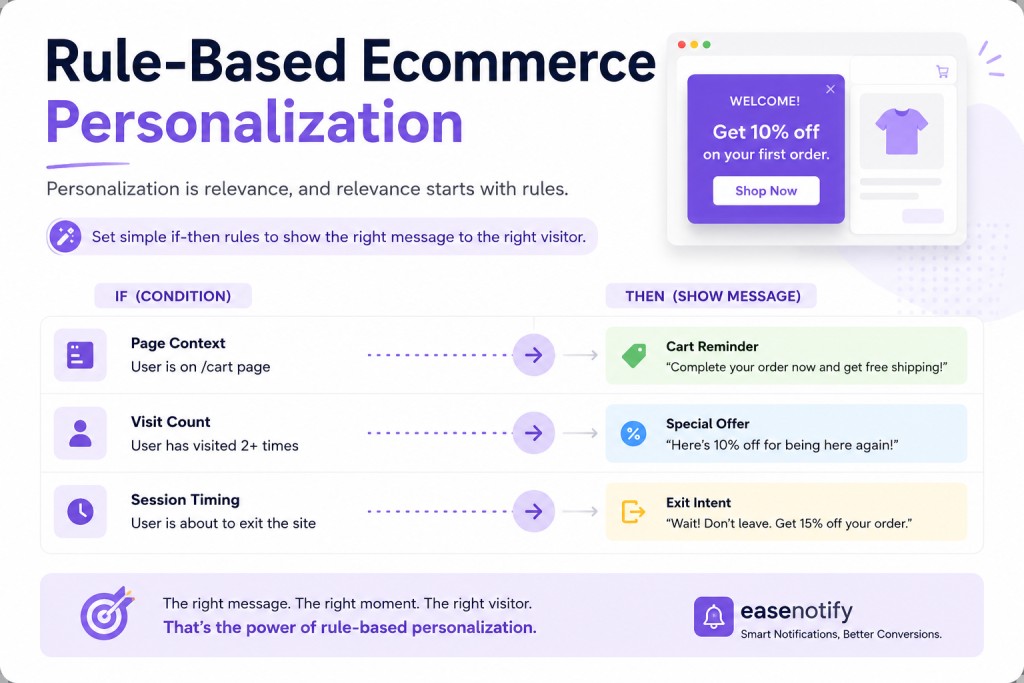
What Is Ecommerce Personalization?
Ecommerce personalization is the practice of adapting what a visitor sees, products, messages, offers, timing, based on signals about who they are or what they are doing. The payoff is well documented: McKinsey found that 71% of consumers expect personalized interactions and that personalization leaders generate substantially more revenue from it than laggards. Salesforce’s State of the Connected Customer adds the blunter version: 80% of customers say experience matters as much as the product.
But “personalization” spans a huge range, from a geo-targeted shipping banner to a neural recommendation engine. The examples below deliberately stay at the end of the range you can actually implement this week.
Why Do Most Personalization Guides Point You at the Wrong Tools?
Because the guides are written by the vendors of the expensive end. Recommendation engines need purchase history volume that most growing stores simply do not have; an algorithm cannot find patterns in data that does not exist yet.
Rule-based personalization inverts the requirements. You supply the intelligence (“visitors on sale pages are price-sensitive”), and the tool supplies the execution (show the price-focused message there, and nowhere else). Strategy-level thinking about these segments lives in our behavioral marketing pillar; what follows is the tactical layer.
9 Ecommerce Personalization Examples Built on Simple Rules
Context rules: personalize by where they are
1. Category-matched offers. The rule: if the visitor is browsing the skincare collection, show the skincare bundle message, not a generic sitewide banner. Page Targeting makes each collection page carry its own most-relevant offer. This single swap, generic to contextual, is the cheapest relevance upgrade in ecommerce; setup mechanics are in Shopify announcement bar page targeting.
2. Cart-stage reassurance. The rule: on cart and checkout pages only, switch messaging from promotion to reassurance: returns policy, delivery time, secure checkout. Promotional noise at checkout distracts; trust content converts. The full session-stage logic is in how to reduce cart abandonment.
3. Landing-page continuity. The rule: visitors arriving from a specific campaign URL see a banner that repeats the ad’s promise (“Your 20% spring offer is active”). Message match between ad and page is one of the oldest conversion findings in the book.
Behavior rules: personalize by what they do
4. First-visit vs returning-visit messaging. The rule: first-time visitors see the welcome offer; returning visitors see social proof or new arrivals. Nobody should see a “welcome” message twice. Offer design for the first half of this rule is covered in first time customer discount.
5. Engaged-visitor unlocks. The rule: after 60 seconds on site or two pages deep, reveal the offer message. Engagement-gated messaging reads as relevant where entry popups read as desperate. EaseNotify’s Scheduling Widget handles the delay, and Remember Dismissal keeps closed messages closed.
6. Milestone celebration. The rule: when the cart crosses your free shipping threshold, the bar switches from “You are $12 away” to “Free shipping unlocked.” A progress bar that never acknowledges completion wastes its own payoff. The threshold mechanics live in free shipping bar for Shopify.
Time rules: personalize by when it is
7. Deadline-aware urgency. The rule: countdown messaging appears only in the final 24 hours of a sale, when it is true and urgent, instead of running stale all week.
8. Hour-of-day shipping cutoffs. The rule: “Order in the next 3 hours for same-day dispatch” shows only during hours when it is accurate. Scheduled honesty is urgency that never backfires.
9. Seasonal auto-rotation. The rule: campaign messages start and stop themselves on the calendar. No more January banners advertising December offers, which is a silent trust leak on more stores than you would think.
How Do You Start Personalizing Without a Data Team?
Start with one rule, the category-matched offer, because it requires zero historical data and produces visible relevance immediately. Then add one rule per week, measuring each against the generic baseline it replaced.
EaseNotify is a website notification and announcement bar tool for Shopify and web businesses, and its widget controls map one-to-one onto the rules above: Page Targeting for context rules, the Scheduling Widget for behavior and time rules, the Sticky Widget to keep messages present through the session, Auto-close and customizable Close Buttons to keep them polite. At $6 per month for Pro, the execution layer costs less than a coffee, which is the point: the constraint on personalization for small stores was never intelligence, it was tooling priced for enterprises.
One caution as you scale it: personalization should feel like good service, not surveillance. Rules built on page context and session behavior stay comfortably on the service side of that line, which is also where Nielsen Norman Group’s personalization research finds user comfort is highest.
Frequently Asked Questions (FAQs)
Q: What is ecommerce personalization? A: It is adapting what each visitor sees, offers, messages, products, timing, based on signals like the page they are viewing, whether they have visited before, or what is in their cart. It ranges from simple targeting rules to AI recommendation engines.
Q: What are the easiest ecommerce personalization examples to implement? A: Category-matched banner offers, different messages for first-time versus returning visitors, cart-page reassurance messaging, and scheduled seasonal rotation. All four run on simple targeting rules with no historical data or algorithms required.
Q: Does personalization work for small ecommerce stores? A: Yes. Rule-based personalization needs no data volume, just logic like “show this message on these pages after this delay.” Small stores often see clearer gains than large ones because they are replacing fully generic messaging.
Q: Do I need AI for website personalization? A: No. AI-driven product recommendations need large purchase datasets, but message-level personalization runs on rules you define. Most stores should master rule-based targeting first and consider algorithmic tools only after traffic and order volume justify them.
Q: How do I measure whether personalization is working? A: Change one rule at a time and compare conversion rate or click-through against the generic message it replaced over at least two weeks. Rule-based systems are easy to test precisely because each rule is explicit.
Personalization is not a technology tier. It is the discipline of showing each visitor the message that fits their moment. Start with one rule this week and let the results argue for the next one. EaseNotify gives you the whole rule-execution layer free to start.
Start your free EaseNotify plan at easenotify.com.