
Shopify announcement bar page targeting is the single most underused conversion lever in ecommerce. Most Shopify stores run one announcement bar with one message across every page — the same text greeting a first-time visitor on the homepage as someone with three items already in their cart. That is the equivalent of a store associate shouting the same pitch at every customer regardless of where they are in the store or what they are doing.
Targeted announcement bars convert 40 to 60 percent better than generic sitewide bars according to easyappsecom.com’s 2026 Shopify announcement bar performance data. The difference is not the bar itself. It is matching the message to what the visitor is trying to do on that specific page.
EaseNotify is a website notification and announcement bar tool for Shopify and web businesses. This guide covers the five proven rules for Shopify announcement bar page targeting and how to implement them without touching your theme code.
Key Takeaways
- Shopify announcement bar page targeting converts 40-60% better than a single sitewide message. The lift comes from matching message intent to visitor intent, not from the bar format itself.
- Every page type in your Shopify store has a different visitor goal. Homepage visitors are browsing. Product page visitors are evaluating. Cart page visitors are deciding. Each goal needs a different message to push them forward.
- Free shipping bars perform best on product pages, where purchase intent is highest. easyappsecom.com data puts free shipping bar CTR at 6.2% — the highest of any announcement bar message type.
- URL-targeted bars convert at 2.4% vs significantly lower rates for sitewide bars. According to Omnisend’s 2025 segmentation research, page-specific messaging consistently outperforms generic sitewide campaigns.
- Shopify’s native announcement bar does not support page targeting. It shows one static message across every page. You need a third-party app to run different bars on different pages.
The Buyer Intent Ladder: What Visitors Want on Each Page
Before setting up Shopify announcement bar page targeting, you need to understand what each page is for. Visitor intent changes as they move through your store. The bar message that converts on the homepage will actively hurt conversion on the cart page — and vice versa.
| Page Type | Visitor Intent | What They Need | Wrong Message to Show |
|---|---|---|---|
| Homepage | Browsing, orienting | Reason to explore further | “Only 2 left in stock!” |
| Collection page | Discovering, filtering | Category-specific reasons to click | Generic brand welcome |
| Product page | Evaluating, comparing | Purchase trigger (shipping, urgency, offer) | New collection announcement |
| Cart page | Deciding, doubting | Reassurance and final push | Discount invitation (trains abandonment) |
| Blog / content pages | Learning | Soft CTA, email capture | Flash sale urgency |
This is the Buyer Intent Ladder. Visitors climb it as they move through your store. Your announcement bar should meet them on the rung they are currently standing on — not push them back down to a message designed for an earlier stage.
A visitor who has already added three items to their cart does not need to hear about your new arrivals. They need to know their order will ship today if they check out in the next 90 minutes. That message, shown on the cart page, uses urgency marketing at the exact moment it is most effective.
The 5 Proven Rules for Shopify Announcement Bar Page Targeting
Rule 1: Homepage — Broadcast Your Best Offer or Trust Signal
The homepage is where visitors with no prior intent land. They are asking: “Is this store worth my time?” Your announcement bar on the homepage has one job — give them one clear reason to keep browsing.
What works:
- Welcome discount for first-time visitors: “Get 10% off your first order — use code WELCOME10”
- Brand trust signal: “Free returns on all orders. No questions asked.”
- Social proof: “Trusted by 50,000+ customers worldwide”
- Seasonal campaign: “Summer Sale — up to 40% off ends Sunday”
What does not work: Inventory urgency (“Only 2 left!”) and shipping cutoff timers. These require product context the homepage visitor does not have yet. Showing urgency without context creates skepticism, not action.
CTR benchmark: 2.8 to 3.6% for a well-matched homepage bar.
Rule 2: Collection Pages — Use Category-Specific Offers
Collection pages are where visitors signal category intent. A visitor on your “Skincare” collection page is not the same as one on your “Supplements” collection page. A sitewide bar showing a generic offer wastes this signal.
What works:
- Category discount: “20% off all skincare — ends tonight”
- Category-specific free shipping threshold: “Free shipping on skincare orders over $45”
- New arrivals callout: “New skincare drops this week — scroll to see them”
What does not work: Generic sitewide messages miss the intent signal entirely. A visitor who has filtered to a specific category is already more engaged than average. Matching the bar to their category lifts CTR by significantly more than a sitewide message.
CTR benchmark: Targeted collection page bars average 4.1% CTR, versus 2.1% for sitewide bars shown on the same pages.
Rule 3: Product Pages — Show the Free Shipping Threshold
Product pages are the highest-intent pages in your store. The visitor is evaluating a specific item. The single highest-converting announcement bar message at this stage is the free shipping bar showing how close they are to the free shipping threshold.
What works:
- Free shipping threshold: “Free shipping on orders over $75 — add $22 more to qualify”
- Urgency with specificity: “Order in the next 3 hours for same-day dispatch”
- Social proof volume: “1,247 people bought this item this week”
- Limited stock with number: “Only 4 left at this price”
What does not work: Welcome discounts. If someone is already on a product page, showing a first-order discount tells them they could have paid less if they had noticed it earlier. It creates price anxiety at the worst possible moment.
CTR benchmark: Free shipping bars on product pages achieve 6.2% CTR — the highest of any bar message type according to easyappsecom.com performance data. Pairing the free shipping bar with a countdown timer on product pages during sales periods increases CTR by a further 35 to 45%.
Rule 4: Cart Page — Reassure, Do Not Discount
The cart page is where most stores make the worst announcement bar mistake. They show a discount code. This actively trains visitors to abandon carts in search of better offers. If someone has already built a cart, they have already decided to buy. Your job on the cart page is to remove reasons not to complete the purchase.
What works:
- Trust signal: “Secure checkout. 30-day free returns. Free shipping on this order.”
- Dispatch urgency: “Order in the next 47 minutes for same-day shipping”
- Guarantee: “Not happy? Return it for free within 30 days — no forms, no questions”
- Cart protection: “Your cart is saved for 24 hours”
What does not work: Discount offers. Exit-intent discounts belong on popups triggered by cursor movement toward the back button — not on the persistent announcement bar that is visible throughout the checkout flow.
CTR benchmark: Trust-focused cart page bars see 4.8% CTR on average. Urgency-focused dispatch countdown bars see 5.1% CTR when the timer is real.
Rule 5: Blog and Content Pages — Soft CTA Only
Blog readers are in research mode. They have not decided to buy yet. A hard-sell message on a content page creates friction and increases bounce rate. The announcement bar on content pages should do one of two things: capture an email or create brand association.
What works:
- Email capture: “Get our free Shopify conversion checklist — enter your email”
- Newsletter offer: “Subscribe for weekly ecommerce tips + 10% off your first order”
- Low-friction brand message: “EaseNotify — the announcement bar that pays for itself”
What does not work: Flash sale urgency. A countdown timer on a blog post is incoherent — the reader has no product context. It reads as spam.
Why Shopify’s Native Bar Cannot Do This
Shopify’s built-in announcement bar in the theme editor supports one message shown across every page of your store. There is no native option to show different bars based on page type, URL, customer tag, cart value, or any other targeting condition.
This is a documented limitation the Shopify Community has requested for years. The active thread “Different announcement bars different pages” has continued without a native solution. Shopify’s own documentation confirms the bar is a global theme section with no built-in targeting rules.
The only way to implement Shopify announcement bar page targeting is through a third-party app. When evaluating apps, check for:
| Feature | Why It Matters |
|---|---|
| URL-based targeting | Show bars only on specific page paths |
| Page-type targeting | Separate rules for homepage vs. product vs. cart |
| Scheduling | Run different bars during sale periods without manual switching |
| Remember Dismissal | Prevent annoying a visitor who already closed the bar |
| No CLS impact | App should not cause layout shift when it loads (see our announcement bar page speed guide) |
For a full comparison of apps that support page targeting, see our best announcement bar tools for Shopify guide.
How to Set Up Page Targeting in EaseNotify
EaseNotify’s Page Targeting feature lets you assign each bar campaign to specific pages or page types without editing theme code.
Step 1: Create a new bar campaign In your EaseNotify dashboard, click “New Bar.” Choose your bar style, message, and design.
Step 2: Set your Page Targeting rule Under “Display Settings,” open the Page Targeting panel. Choose from:
- All pages (default — sitewide)
- Homepage only
- Specific URLs (paste the exact path:
/products/,/cart,/collections/skincare) - URL contains (match any URL containing a pattern, e.g.,
/collections/)
Step 3: Enable Remember Dismissal Turn on “Remember Dismissal” to prevent showing the bar again to a visitor who has already closed it on this device. This keeps the bar from feeling intrusive on return visits.
Step 4: Disable your theme’s native bar Before activating the EaseNotify bar, go to Online Store > Themes > Customize > Announcement Bar and remove the native bar message. Running two bars simultaneously creates a layout conflict and a poor UX.
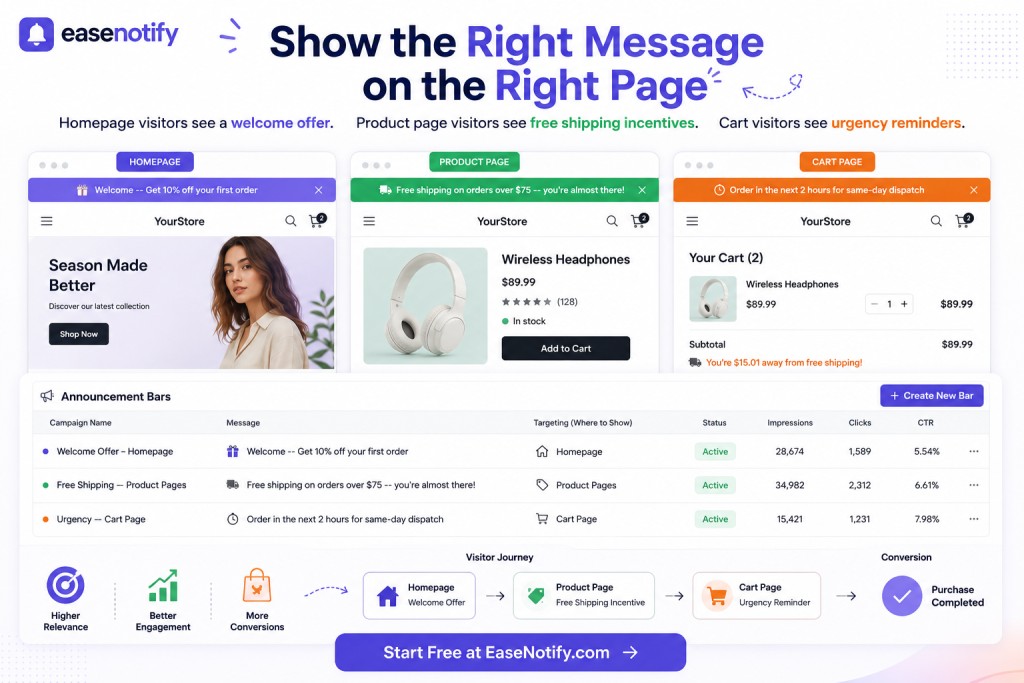
Step 5: Set up your full page targeting stack Create separate bar campaigns for each page type:
- Bar 1: Homepage — welcome offer or trust signal
- Bar 2: Product pages — free shipping threshold
- Bar 3: Cart page — dispatch urgency or trust signal
- Bar 4: Blog pages — email capture or brand message
Each bar runs independently. EaseNotify loads only the bar matching the current page, which means the script executes on fewer page loads and has a lower cumulative impact on your store’s page speed budget.
Page Targeting Mistakes That Kill CTR
Mistake 1: Showing a discount on the cart page Cart page discount bars train abandonment. Visitors learn to leave carts to wait for a better offer. Use trust signals and urgency on the cart page instead.
Mistake 2: Using urgency on pages with no product context A countdown timer on a blog post or homepage means nothing to a visitor who has not seen a product yet. Urgency requires context. Pair it with a specific product, offer, or shipping deadline.
Mistake 3: Running the native theme bar and an app bar simultaneously Two bars stack on top of each other, break your layout, and trigger CLS. Always disable the native bar before activating an app bar. See our announcement bar page speed guide for how to check your CLS score after setup.
Mistake 4: Same message during sale and non-sale periods Shopify announcement bar page targeting works best when combined with scheduling. A “40% off Summer Sale” bar running after the sale ends destroys trust. Use the Scheduling Widget to set exact start and end dates for each campaign.
Mistake 5: Not testing mobile Over 70% of Shopify traffic is mobile. Set up your targeted bars, then check each page on a 375px viewport. Bar text that wraps across two lines on mobile defeats the purpose of a targeted message. Keep messages under 60 characters.
For a full breakdown of how announcement bars affect your Shopify conversion rate beyond page targeting, see our conversion rate optimization guide.
Frequently Asked Questions (FAQs)
Q: Does Shopify have built-in announcement bar page targeting? No. Shopify’s native announcement bar in the theme editor shows one static message across every page. There is no built-in option to target different bars to different page types, URLs, or customer segments. You need a third-party app like EaseNotify to run Shopify announcement bar page targeting.
Q: How many different announcement bars can I run at the same time on Shopify? With EaseNotify, you can run as many bar campaigns as you need, each with its own page targeting rule. In practice, 3 to 4 targeted bars cover the full buyer journey: one for the homepage, one for product pages, one for the cart page, and an optional one for blog content. Running more than 4 active bars risks overlapping targeting rules and inconsistent UX.
Q: Will page-targeted announcement bars hurt my Shopify page speed? Not if they are implemented correctly. EaseNotify loads only the bar matching the current page URL, which means the script does not execute on pages where no bar is targeted. This reduces the cumulative script load compared to a sitewide bar that runs on every page. For a full technical breakdown, see our announcement bar page speed guide.
Q: What is the best announcement bar message for a Shopify product page? The free shipping threshold bar is the highest-converting message on product pages, with an average 6.2% CTR according to easyappsecom.com performance data. Show the specific amount the visitor needs to add to qualify: “Free shipping on orders over $75 — add $18 more.” Pair it with a countdown timer during sale periods for a further 35 to 45% CTR lift.
Q: Should I show the same announcement bar to returning customers and new visitors? No. New visitors need trust signals and welcome offers. Returning customers, especially those who have already purchased, respond better to new arrival announcements, loyalty offers, and exclusive access messaging. Advanced page targeting tools support customer tag targeting to segment these audiences. At minimum, use the Remember Dismissal feature so repeat visitors who already closed the bar do not see it again on every visit.
Q: How is announcement bar page targeting different from a popup? An announcement bar is persistent and passive — it sits at the top or bottom of the page without interrupting the browsing experience. A popup is active and interruptive — it demands immediate attention and action. Page targeting is valuable for both formats, but the use cases differ. See our announcement bar vs popup comparison for a full breakdown of when to use each.
Start your free EaseNotify plan at easenotify.com. Set up your page targeting stack in under 10 minutes — no theme code, no developer, no CLS.
4 thoughts on “Shopify Announcement Bar Page Targeting: 5 Proven Rules for Higher CTR”