
A Shopify countdown timer is one of the fastest ways to move a hesitant buyer. But placement determines whether it converts or gets ignored.
Most Shopify stores put countdown timers in the wrong place. They stick one on the homepage, watch it get scrolled past, and conclude timers do not work. The timer works. The placement does not.
This post covers the five placements that consistently drive sales, the two that quietly backfire, and how to set up a Shopify countdown timer that actually closes.
Key Takeaways
- Countdown timers work by triggering loss aversion, which is stronger than the desire to gain
- Placement within the buyer’s journey matters more than design or timer length
- Cart and product page timers outperform homepage timers by a significant margin
- Fake urgency (timers that reset on reload) permanently damages trust and conversion
- A sticky announcement bar with a countdown timer is the lowest-friction, highest-visibility placement on Shopify
Why Most Shopify Countdown Timers Fail
The psychology behind a countdown timer is straightforward. People are more motivated by the fear of losing something than by the prospect of gaining something. A Harvard Business School study found that loss aversion is roughly twice as powerful as the equivalent gain.
But that psychological lever only activates when the visitor is close to a decision. Show a countdown timer to someone who just landed on your homepage and has never seen your product, and it registers as noise. Show it to someone who has spent three minutes reading a product page, and it lands with full weight.
The failure pattern is almost always the same: the timer appears too early, on the wrong page, attached to an offer the visitor has no context for yet.
5 Shopify Countdown Timer Placements That Work
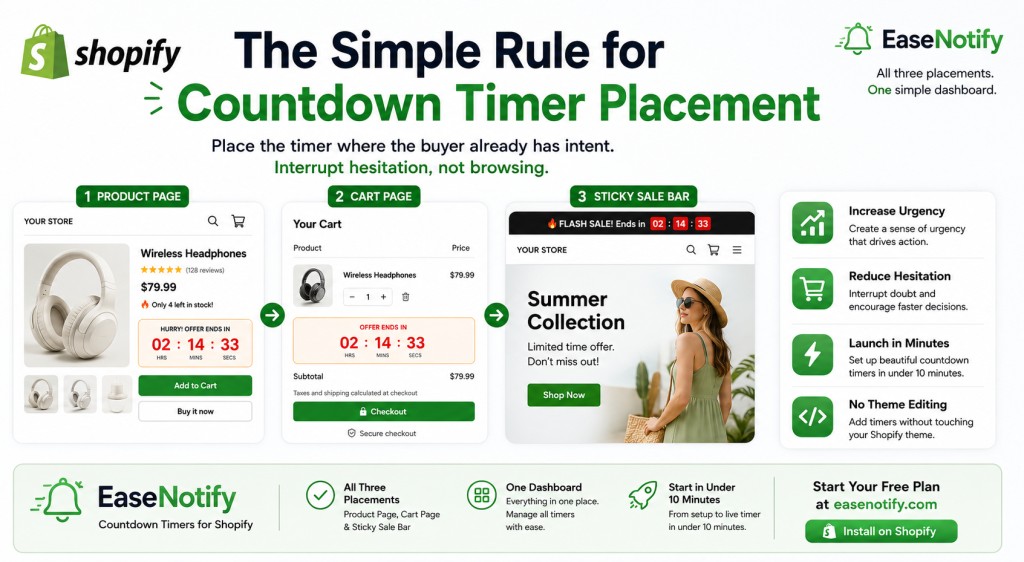
1. The Product Page Timer: Closest to the Decision
The product page is where buyers stall. They have found what they want. They are reading the description, checking reviews, calculating shipping. This is the highest-value moment to introduce a countdown timer.
Place the timer directly above or below the Add to Cart button. The message should be specific: “Sale ends in 2:47:31” or “Only valid today” with a visible countdown. Avoid placing it in the page header where it competes with navigation. The goal is to interrupt the hesitation loop right at the point of commitment.
This placement works because the visitor already has intent. The timer removes the option to delay.
2. The Cart Page Timer: Recovering the Almost-Purchase
The average cart abandonment rate is 70.19% according to the Baymard Institute. Most of that abandonment is not a firm “no.” It is a “maybe later” that never converts.
A countdown timer on the cart page changes the framing from “I can come back to this” to “this offer is expiring.” Pair it with a specific incentive: the current discounted price, free shipping threshold, or a gift-with-purchase that expires with the timer. The cart page is one of the most underpowered pages in most Shopify stores and one of the highest-leverage places to add urgency.
3. The Sticky Announcement Bar: Always Visible, Never Intrusive
A sticky announcement bar with a live countdown timer is the most versatile placement on this list. It sits at the top of every page, travels with the visitor through the entire browsing session, and communicates urgency without interrupting the shopping experience the way a popup would.
This format is particularly effective for sitewide sales, free shipping windows, and flash events. EaseNotify’s announcement bar widget supports a built-in countdown timer that persists across pages with page targeting controls, so you can show the timed offer only on product pages or collections while suppressing it on the checkout flow where distraction costs you conversions.
At $6 per month, EaseNotify Pro unlocks the full countdown and scheduling stack without developer involvement.
4. The Exit-Intent Trigger: One Last Push Before They Leave
When a visitor moves their cursor toward the browser tab to close the page, that is the exit-intent signal. Triggering a countdown timer at this moment, attached to a specific offer, catches buyers who were on the fence and just needed a reason to stay.
The key is that the offer has to be real and time-bound. “Wait, your cart expires in 10 minutes” combined with a visible timer works because it introduces a deadline that did not exist a moment ago. Pair this with behavioral marketing targeting so it only fires for visitors who have been on site for a minimum session duration, not everyone who glances at a page and leaves.
5. The Campaign Landing Page: Owned Traffic with Full Control
For email campaigns, SMS drops, and paid ads, the landing page is where you have the most control over context. The visitor clicked because of a specific offer. The countdown timer on that landing page reinforces exactly what they came for.
This placement also avoids one of the biggest countdown timer mistakes: showing a generic timer to visitors with no prior context. On a campaign landing page, the context is already established. The timer is the closing argument, not the opening pitch.
2 Countdown Timer Placements That Backfire
1. The Homepage Hero Timer With No Offer Context
Putting a countdown timer in the homepage hero section before a visitor knows what your store sells is conversion theater. The timer looks urgent. It communicates nothing. Visitors who land on a homepage for the first time need to understand the value proposition first. A timer without context is just pressure without a reason to respond.
Save the countdown for pages where the visitor already understands what they are considering buying.
2. The Resetting Timer: The Fastest Way to Destroy Trust
A shopify countdown timer that restarts every time the page loads is one of the most common and most damaging tactics in ecommerce. Buyers notice. Once a visitor sees a “24-hour sale” timer reset on page reload, the store’s credibility drops immediately and permanently.
Fake urgency does not just fail to convert, it actively trains visitors not to trust anything the store says. If the sale ends in four hours, the timer should end in four hours. EaseNotify’s countdown timer widget syncs to a real end time rather than a session-relative clock, so the urgency shown is urgency that is actually there.
How to Add a Countdown Timer to Your Shopify Store
You do not need a developer to add a countdown timer to Shopify. EaseNotify installs as a Shopify app and lets you configure a countdown timer announcement bar in under five minutes:
- Install EaseNotify from the easenotify.com
- Choose the announcement bar widget with countdown enabled
- Set the offer end date and time (not a session-relative duration)
- Configure page targeting to show the timer only on product or cart pages
- Set the sticky behavior so the bar travels with the scroll
- Publish
The free plan supports one active widget. The Pro plan at $6/month unlocks multiple simultaneous widgets, scheduling, and advanced targeting.
For more on building urgency campaigns that go beyond single-page timers, the full framework is covered in the urgency marketing for DTC brands guide.
Frequently Asked Questions
Does Shopify have a built-in countdown timer? No. Shopify does not include a native countdown timer feature. You need a third-party app or custom code to add a countdown timer to your Shopify store. Apps like EaseNotify add a countdown timer via an announcement bar widget without requiring theme edits or developer involvement.
Where is the best place to put a countdown timer on Shopify? The highest-converting placements are the product page (near the Add to Cart button), the cart page, and a sticky announcement bar that persists across all pages. Homepage timers perform poorly because visitors lack purchase context at that stage.
How long should a Shopify countdown timer run? For flash sales, 4-24 hours produces the strongest urgency response. For longer promotional periods (3-7 days), pair the timer with a progress bar or diminishing stock indicator to maintain urgency across the sale window. Timers longer than 7 days lose their psychological impact.
Will a fake countdown timer increase conversions? Short-term, yes. Medium-term, it destroys trust. Once a buyer notices a timer resetting, they discount all future urgency signals from that store. Use real end times tied to actual offer expiry. The behavioral marketing guide covers why manufactured urgency collapses under repeat visitor scrutiny.
Can I show a shopify countdown timer only on specific Shopify pages? Yes, with page targeting. EaseNotify’s page targeting feature lets you display the countdown timer only on product pages, cart pages, or specific collection URLs. This prevents the timer from appearing on the checkout page (where it creates distraction rather than urgency) or the homepage (where it appears without context).
Do countdown timers work for all types of Shopify promotions? Countdown timers are most effective for time-sensitive offers: flash sales, free shipping windows, limited stock events, and launch-day pricing. They are less effective for evergreen offers without a genuine deadline. For those, consider a notification bar that highlights the ongoing benefit rather than forcing artificial urgency.
The Simple Rule for Countdown Timer Placement
Place the timer where the buyer already has intent. Interrupt hesitation, not browsing.
Product page. Cart page. Sticky bar during an active sale. Those three placements cover the majority of Shopify countdown timer value. Everything else is secondary.
EaseNotify gives you all three from a single dashboard without touching your Shopify theme. Start your free plan at easenotify.com and have a live countdown timer running in under ten minutes.
Want more? Upgrade today to the PRO version and unlock full page targeting, scheduling, and multi-widget control.
2 thoughts on “Shopify Countdown Timer: 5 Placements That Drive Sales (And 2 That Quietly Backfire)”