
Social proof notification examples are the piece most guides skip. They explain the psychology, document the conversion lift, describe the setup and then leave you staring at an empty copy field in your notification dashboard. What exactly do you write?
The answer depends on three variables: your product vertical, the widget type you are running (recent sales notification versus live visitor counter), and the session stage at which the notification appears. A message that converts on a beauty product page reads differently from one that converts in a supplements store. A notification shown to a first-time visitor serves a different job than one shown to a visitor sitting on the cart page.
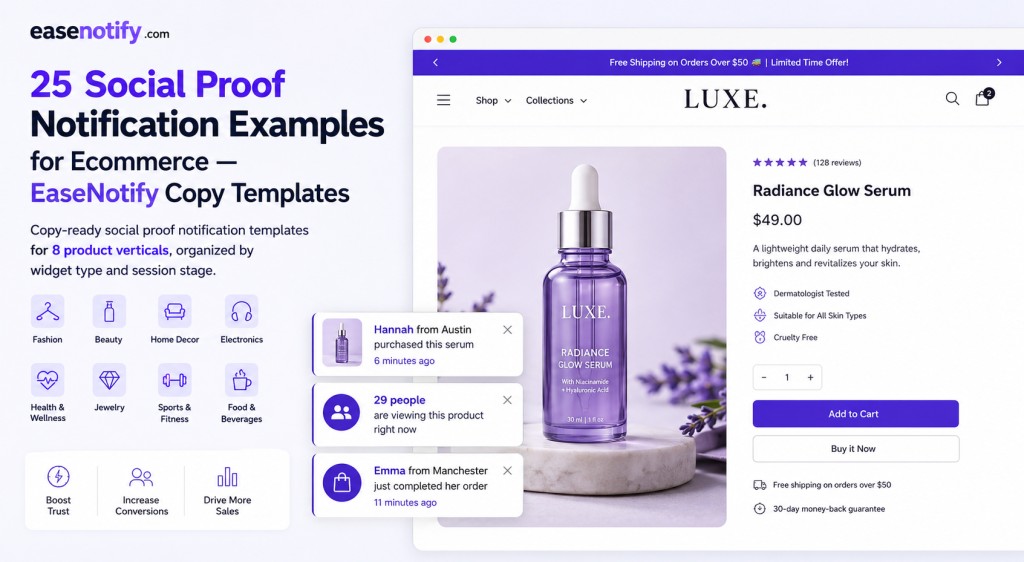
This post covers all three: 25 copy-ready social proof notification examples organized by vertical, widget type, and session stage built for EaseNotify’s recent sales notification and live visitor counter widgets, and usable on any Shopify store, WooCommerce store, or web business
Key Takeaways:
- The highest-converting social proof notifications contain three elements: a real person signal (first name and location), a recency signal (minutes or hours ago), and a product specificity signal (product name or category, not just “something”).
- Generic messages like “Someone just bought this” underperform messages with specific names, locations, and time stamps by a measurable margin — specificity is the conversion trigger.
- Copy should vary by product vertical. Fashion social proof activates identity. Supplement social proof activates results confidence. Beauty social proof activates skin-type trust.
- Cart-stage social proof notification copy works differently from product-page copy. On the cart page, the message should reinforce the decision already made, not introduce new discovery.
- All 25 templates here are starting points. The most effective message for your store comes from running two variants simultaneously for 14 days and observing which produces the higher add-to-cart rate.
- EaseNotify’s social proof widget pulls live order data, so the first name, location, and recency fields in these templates are auto-populated from your real order history — no manual entry required.
Why Social Proof Notification Copy Matters More Than Design
The notification design — rounded corners, brand color accent, bottom-left placement — is table stakes. Every major social proof tool ships a clean, non-intrusive toast notification that looks professional out of the box. Design does not differentiate performance between social proof implementations. Copy does.
According to provesrc.com’s notification research, real-time purchase notifications increase conversions by 10 to 32 percent on product pages. That range — 22 percentage points wide — is almost entirely explained by implementation quality. The most important implementation variable is copy. Specifically:
- Specificity. “James from Chicago purchased this 8 minutes ago” outperforms “Someone just bought this” because it signals real transaction data rather than a marketing construction. Visitors can distinguish a specific name and city from a generic placeholder within seconds.
- Recency accuracy. “4 minutes ago” creates more urgency than “recently” or “today.” The precision of the time signal is itself a trust indicator — fabricated notifications typically use vague time language because they cannot generate accurate timestamps.
- Product relevance. Notifications that reference the specific product or product category the visitor is currently viewing convert at higher rates than generic “purchase” notifications. The message needs to feel contextually earned.
The 25 examples below are built on all three principles.
The Anatomy of a High-Converting Social Proof Notification
Every high-converting recent sales notification follows the same structure:
[First name] from [City] [purchased/just ordered/just got] [specific product or category] — [X minutes/hours] ago
Each element does a specific conversion job:
| Element | Conversion Job | What Happens Without It |
|---|---|---|
| First name | Humanizes the transaction — real people, not robots | Generic “Someone” reads as marketing fabrication |
| City | Geographic specificity increases trust — the buyer is a real person in a real place | Removed or replaced with country only — less persuasive |
| Action verb | Sets the emotional tone (purchased = completed; just got = excited; just ordered = momentum) | Missing action creates grammatically awkward notification |
| Product/category | Confirms the social proof is relevant to this specific product | Generic notification feels out of context |
| Time stamp | Recency is the urgency mechanism — the more recent, the stronger the FOMO signal | “Recently” or no time = perceived as static, not live |
EaseNotify’s social proof widget auto-populates the name, city, and time stamp from your live order data. The product field can be set to pull the specific product name or a category label depending on your preference. The action verb is editable in the dashboard copy field.
Recent Sales Notification Examples by Vertical (15 Templates)
Fashion and Apparel
Fashion social proof activates identity rather than just validation. The buyer is not just looking for evidence that the product is good — they are looking for evidence that people like them are buying it. Location specificity carries more weight in fashion than in most other verticals because it implies style context.
Template 1 — Product page, discovery stage: “Sofia from New York just purchased this jacket — 3 minutes ago.”
Template 2 — Product page with size or variant signal: “Tyler from London ordered this in black — 9 minutes ago.”
Template 3 — Collection page or broader category view: “26 shoppers added items from this collection in the last hour.”
The third template uses an aggregate signal rather than a single purchase — useful when individual order data would reveal low transaction volume. An aggregate count (“26 shoppers”) creates social proof without requiring a single named buyer.
Beauty and Skincare
Beauty social proof carries a skin-type trust dimension that other verticals do not. A buyer evaluating a serum wants to know that someone with similar skin concerns made this purchase and had a reason to. Copy that implies skin type, concern, or routine context performs better than generic purchase notifications in this vertical.
Template 4 — Product page, product-specific: “Priya from Toronto just ordered this vitamin C serum — 5 minutes ago.”
Template 5 — Category-level copy for collection pages: “Lena from Los Angeles purchased a skincare routine item — 14 minutes ago.”
Template 6 — Bundle or multi-product: “Aisha from Dubai completed a full skincare order — just now.”
The “just now” time stamp is the most urgent version — use it only when you have confirmed recent order activity. EaseNotify’s live order data pulls the actual time stamp, so “just now” will display only when a genuinely recent transaction qualifies.
Health and Supplements
Supplements face higher purchase skepticism than most categories because the buyer cannot evaluate the product before purchasing and the results claim is inherently difficult to verify before committing. Social proof copy for supplements should lean into the results-confidence signal: other people chose this, which implies it works.
Template 7 — Product page: “Marcus from Sydney ordered this protein powder — 7 minutes ago.”
Template 8 — With subscription or repeat purchase signal: “Olivia from Austin just reordered her monthly supply — 2 minutes ago.”
Template 8 implies repeat purchase behavior without stating it explicitly. The word “reordered” and “monthly supply” communicate habitual use — one of the strongest social proof signals available in the supplement category.
Template 9 — Bundle or starter kit: “James from London just started his 90-day program — 18 minutes ago.”
Fitness and Activewear
Fitness social proof activates community belonging — the same mechanism Gymshark built an eight-figure business on. Copy that signals active use and community performs better than generic purchase language.
Template 10 — Product page: “Ryan from Chicago just picked up these training shorts — 4 minutes ago.”
Template 11 — Pre-workout or performance product: “Zoe from Melbourne added this to her pre-workout stack — 11 minutes ago.”
Template 12 — Limited edition or drop: “Noah from Berlin secured a pair before they sell out — 6 minutes ago.”
Template 12 is the highest-urgency version — best used during a limited-edition drop or low-stock scenario where “secured” implies they acted before it was too late.
Home Goods and Decor
Home goods social proof benefits from interior context — the buyer is imagining the product in their space, and the notification reinforces that other people are making the same imagined decision in real rooms.
Template 13 — Product page: “Emma from Seattle just ordered this table lamp — 12 minutes ago.”
Template 14 — Bundle or room set: “David from Barcelona completed his living room order — 8 minutes ago.”
Pet Products
Pet product buyers are proxy purchasers — they are buying for an animal, and the emotional stakes are higher than typical purchases. Social proof copy that acknowledges the proxy-purchase dynamic converts well here.
Template 15 — Product page: “Sarah from Dublin just ordered this for her golden retriever — 4 minutes ago.”
The pet name or type (“golden retriever” versus “dog”) adds specificity that feels human and real rather than generically manufactured. EaseNotify’s widget auto-fills name and location from order data; the product specificity comes from your configured product name or category field.
Live Visitor Counter Examples (5 Templates)
The live visitor counter shows real-time page view numbers. Unlike recent sales notifications, there is no name or location — only a count. The copy job is to translate that number into a competitive arousal signal: other shoppers are evaluating this right now.
The rule for visitor counter copy: the number must be meaningful. “31 people viewing this” creates urgency. “3 people viewing this” signals low demand. If your product pages average fewer than 15 concurrent visitors during normal hours, reserve the visitor counter for sale periods and campaign days when traffic genuinely spikes.
Template 16 — Standard product page: “31 people are viewing this right now.”
Template 17 — High-demand product page during sale: “47 shoppers are looking at this — it is moving fast.”
Template 18 — Limited stock scenario: “28 people viewing this. Only 5 left in stock.”
Template 18 stacks two FOMO signals: visitor count (competition) and low stock (scarcity). Use this combination only when both counts are genuine — verified concurrent visitors and confirmed inventory data.
Template 19 — Cart page visitor counter: “22 people have this in their cart right now.”
Moving the visitor counter to the cart page shifts the signal from “people are looking” to “people are buying” — a stronger urgency mechanism at the decision-confirmation stage. This requires product-specific cart page targeting in EaseNotify.
Template 20 — New product launch: “64 people are checking out this new arrival right now.”
The word “checking out” creates lighter urgency than “about to buy” — appropriate for a new product where purchase history is not yet available to anchor the social proof signal.
Cart-Stage Social Proof Notification Examples (5 Templates)
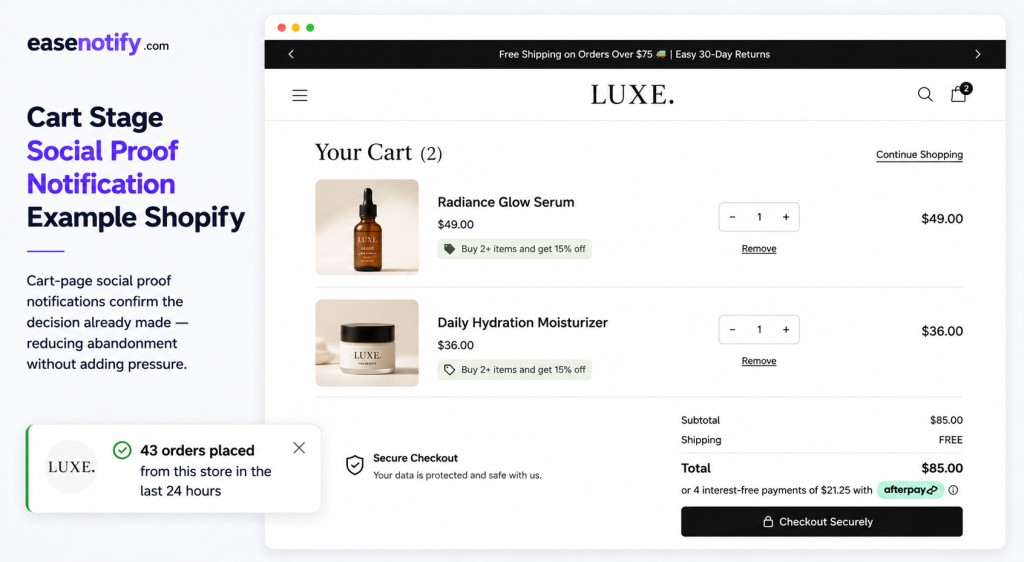
Cart-stage social proof notifications serve a fundamentally different purpose than product-page notifications. The buyer has already made an evaluation decision — they added to cart. The conversion job at the cart stage is not discovery validation; it is decision confirmation.
Cart-stage notifications should reinforce the purchase decision already made, reduce the anxiety that causes last-minute abandonment, and create a gentle urgency signal without pressuring the buyer into a decision they were not already making.
According to the Baymard Institute, average cart abandonment is 70.19 percent. The three primary reasons are price hesitation, trust hesitation, and decision uncertainty. Cart-stage social proof addresses the second and third directly.
Template 21 — Recent purchase validation: “17 people ordered from this cart today.”
This message reframes the cart itself as a validated decision — not just one product, but the combination of items the buyer has selected. It implies that others made similar purchasing decisions, which reinforces confidence without singling out any specific product.
Template 22 — Trust signal for first-time buyers: “Mia from Toronto just completed her first order — 2 minutes ago.”
“First order” creates a new-buyer-specific resonance for visitors who may be hesitant precisely because they have not purchased from this store before.
Template 23 — Aggregate recent activity: “43 orders placed from this store in the last 24 hours.”
A store-level volume signal is appropriate on the cart page because the buyer’s remaining uncertainty at this stage is about the store (trust) rather than the product (validation). High order volume addresses store trust more directly than product-level social proof.
Template 24 — Last-chance urgency with social proof: “Emma from London just secured her order before the sale ended — 6 minutes ago.”
This template works specifically for cart pages during sale events, where the combination of recency and the implied sale deadline creates both social proof and urgency in a single message.
Template 25 — Post-purchase validation (checkout confirmation page): “You are in good company. 1,200+ customers ordered this month.”
The checkout confirmation page is underutilized for social proof. A notification here does not drive the conversion — it has already happened. But it reduces post-purchase anxiety, improves customer satisfaction, and sets up a positive brand association that increases repeat purchase rates.
What Makes Social Proof Notifications Fail
Copy quality matters. So does deployment configuration. These are the failure modes that prevent well-written notifications from converting:
Fake names, invented locations. Visitors who see the same names appear in the same order on repeated page visits identify the cycle within two sessions. EaseNotify pulls live order data — never use placeholder or invented data.
Wrong page targeting. Recent sales notifications on the homepage or About page have no purchase context and read as advertisements. Restrict product-page social proof to product pages using EaseNotify’s Page Targeting feature.
Notifications that appear immediately on page load. A notification appearing before the visitor has had time to read the product page is experienced as an interruption, not a social signal. The 5 to 8 second delay configured in EaseNotify’s Auto-show timing lets the visitor engage with the page first. The notification then appears as contextual information, not banner advertising.
Low visitor counts displayed prominently. “3 people viewing this” signals low demand. Set a minimum threshold for your visitor counter and use EaseNotify’s Scheduling Widget to activate the counter only during peak traffic windows.
Cart-page urgency that feels manipulative. Cart-stage social proof copy should confirm, not pressure. A visitor with items in their cart has already decided to buy — aggressive last-chance copy at this stage triggers buyer resistance, not faster checkout.
For a complete guide to placement and timing rules, see Social Proof Widget for Shopify: 5 Proven Ways to Turn Hesitant Shoppers into Buyers.
How to Run These Notifications in EaseNotify
EaseNotify’s social proof widget runs alongside announcement bars and countdown timers from the same dashboard — one script, one interface, no additional apps.
Setting up the copy:
- Log in to your EaseNotify dashboard at easenotify.com.
- Click “Create Widget” and select Social Proof Notification.
- Choose widget type: Recent Sales Notification or Live Visitor Counter.
- In the copy field, enter your chosen template. For recent sales notifications, EaseNotify auto-fills the {first_name}, {city}, and {time_ago} variables from your live order data.
- Set the notification delay to 6 seconds (the sweet spot for product pages).
- Set display duration to 5 seconds.
- Enable Remember Dismissal so visitors who have already closed the notification do not see it again in the same session.
Setting up page targeting:
- For recent sales notifications: target
/products/to restrict to product pages. - For cart-page notifications: target
/cartfor cart-specific copy. - For visitor counters during sale events: use the Scheduling Widget to restrict activation to your sale window dates and times.
For the full deployment configuration guide including notification frequency, stacking rules, and mobile optimization, see Social Proof Widget for Shopify: 5 Proven Ways to Turn Hesitant Shoppers into Buyers.
To understand where social proof notifications fit within the broader 7-type social proof framework for ecommerce, see Social Proof for Ecommerce: 7 Proven Types Ranked by Real Conversion Impact.
Frequently Asked Questions (FAQs)
Q: What should I write in a social proof notification?
The highest-converting social proof notification structure is: first name + city + action verb + product/category + time stamp. Example: “Hannah from Toronto just purchased this serum — 4 minutes ago.” Each element contributes a specific trust signal. Remove the city and the buyer becomes abstract. Remove the time stamp and the recency urgency disappears. The combination of all four elements is what makes the notification feel like live data rather than marketing copy.
Q: How long should a social proof notification message be?
Short. One sentence, under 10 words of template copy, with the auto-filled variables adding the specific detail. Notifications are scanned in 2 to 3 seconds — enough time to register the key signals (someone real, bought this recently) before the notification auto-dismisses. Longer copy gets cut off on mobile and introduces too much information to process before the display window closes.
Q: Should I customize social proof notification copy by product?
Yes, if you have enough distinct product categories to justify the configuration effort. A supplements store running different notifications for protein powders versus vitamins sees better conversion alignment than a single generic notification across all products. EaseNotify’s Page Targeting allows different notification copy on different product page URLs, so you can configure vertical-specific copy for your top-performing pages without affecting the rest of the catalog.
Q: Can I use social proof notifications without real order data?
No. Fabricated social proof notifications are both ethically problematic and practically counterproductive. Visitors who identify cycled or fake data disengage from all subsequent notifications on the site. EaseNotify’s social proof widget requires connection to your store platform (Shopify, WooCommerce, or others) to pull live order data. If your store is new and has limited purchase history, use the live visitor counter (which reflects real-time page views) while your order history builds, and add recent sales notifications once you have a consistent transaction flow.
Q: How often should social proof notifications appear?
On product pages, every 10 to 15 seconds creates a steady social signal without creating notification fatigue. On cart pages, reduce frequency to once every 30 seconds — a buyer at the checkout stage needs confidence reinforcement, not repeated interruptions. EaseNotify’s notification frequency setting is configurable per campaign.
Q: What is the difference between a social proof notification and an announcement bar?
An announcement bar sits persistently at the top or bottom of the page and communicates a message to every visitor simultaneously — it is a broadcast. A social proof notification appears briefly in the corner as a toast, communicates a specific data point (a real purchase, a real visitor count), and disappears after 5 to 6 seconds without blocking any page content. They are complementary tools: the announcement bar delivers your offer, the social proof notification validates the purchase decision. For a full comparison of on-site notification formats, see Announcement Bar vs Popup: Which Converts Better?.
Q: How do I combine social proof notifications with urgency marketing?
Run a flash sale announcement bar at the top of the page simultaneously with recent sales notifications at the bottom-left. The bar communicates the offer deadline. The notifications confirm that other buyers are responding to it right now. The combination activates both the rational urgency mechanism (the deadline) and the social validation mechanism (the real-time buyer activity) simultaneously. For the full urgency + social proof integration strategy, see Urgency Marketing for DTC Brands: 7 Campaigns That Convert Without More Ad Spend.
Start With Three Templates, Test for Two Weeks
Twenty-five templates is a menu, not a prescription. Start with three: one recent sales notification for your highest-traffic product page, one visitor counter for your peak traffic window, and one cart-stage notification for your checkout flow. Run each for 14 days. Measure add-to-cart rate on the product page, cart abandonment rate, and completed checkout rate before and after activation.
The copy that converts best will not always be the most creative. It will be the most specific, the most honest, and the most matched to the exact anxiety a visitor at that stage of the session actually has.
For the full breakdown of where to place social proof by page type and conversion stage, see Social Proof for Ecommerce: 7 Proven Types Ranked by Real Conversion Impact.
EaseNotify runs all three notification types — recent sales, visitor counter, and cart-stage — alongside your announcement bars and countdown timers in one dashboard. One script. No plugin conflicts. No developer required.
1 thought on “25 Social Proof Notification Examples for Ecommerce (Copy-Ready for Every Vertical)”