

Every ecommerce store has two tools fighting for the same visitor attention: the announcement bar sitting quietly at the top of every page, and the popup waiting to interrupt at exactly the right moment.
Most store owners treat this as a choice. It is not.
The announcement bar and the popup serve fundamentally different conversion jobs. Choosing one over the other is like choosing between a front door and a sales associate — both have a role, and the stores missing either one are losing revenue they cannot see.
This guide breaks down exactly what each tool does, where the data shows each one wins, and the setup that consistently outperforms stores that rely on only one.
Key Takeaways
- An announcement bar is persistent and non-interruptive. It reaches 100% of page views across an entire session without demanding an action.
- A popup interrupts intentionally. It is the right tool for email capture, exit-intent offers, and gating high-value content where the interruption is justified.
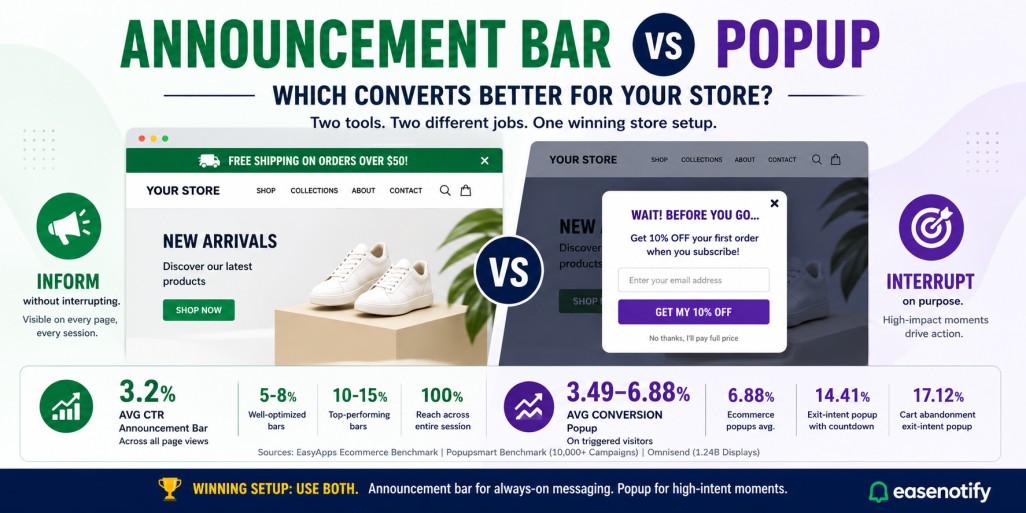
- Announcement bars average a 3.2% CTR with top performers hitting 10-15%. Popups average 3.49-4.82% conversion, with exit-intent popups on ecommerce reaching 6.88%.
- Neither tool replaces the other. High-converting stores run both: a sticky announcement bar for always-on promotions and a behavior-triggered popup for high-intent moments.
- EaseNotify handles the announcement bar side with scheduling, page targeting, countdown timers, and sticky scroll behavior — all without code.
What Is an Announcement Bar?
An announcement bar is a thin horizontal strip displayed at the top or bottom of every page on your website. It delivers one focused message to every visitor — a shipping threshold, a discount code, a product launch, a trust signal — without interrupting their browsing experience.
Also called a notification bar, sticky bar, or hello bar, the announcement bar is part of the page layout. Visitors see it, act on it, or ignore it without ever losing their place. It does not demand a click. It does not block content. It does not require a dismiss action before the visitor can continue.
EaseNotify is a website notification and announcement bar tool built specifically for Shopify merchants and web businesses. It is designed from the ground up for bars, banners, countdown timers, and website widgets.
What Is a Popup?
A popup is an overlay element that appears on top of page content, triggered by a specific visitor behavior — time on page, scroll depth, exit intent, or a click. It demands attention by design. The visitor cannot continue browsing until they interact with it, whether that means submitting an email, claiming an offer, or dismissing it.
Popups are most commonly used for email list growth, exit-intent discount offers, cart abandonment recovery, and gating content like guides or discount codes behind an email submission.
The intentional interruption is the point. A popup earns the visitor’s attention by forcing the moment. The question is whether that forced moment is worth the friction it creates.
The Core Difference: Interruption vs Persistence
The announcement bar and the popup are not competing versions of the same tool. They operate on opposite design principles.
An announcement bar is persistent. It is visible from the first pageview to the last, across every page the visitor browses. It does not require a trigger. It does not require behavior. It is simply there, delivering its message at every point in the session where the visitor might be ready to act.
A popup is interruptive. It waits for a specific moment — 30 seconds on page, 70% scroll depth, cursor moving toward the browser tab — and then demands the visitor’s full attention. That interruption can be incredibly effective when the timing and offer are right. It can also drive visitors away when the timing is wrong.
The conversion context determines which approach wins.
When an Announcement Bar Wins
1. Always-on promotions that should not expire
Free shipping thresholds, loyalty program reminders, and brand-wide discount codes should be visible at every moment during a session, not just after 30 seconds on the homepage. An announcement bar delivers these persistently without creating friction.
2. Time-sensitive offers that need to stay visible
A flash sale with a countdown timer embedded in an announcement bar creates urgency across every page of the session, not just at the moment of entry. Visitors who see the timer on the homepage, then the product page, then the cart page are reminded of the deadline at every decision point.
3. Trust signals on high-traffic landing pages
A social proof bar displaying a review count, a press mention, or a customer milestone builds credibility from the first second of a visit. Unlike a popup that introduces the same information as an interruption, a bar delivers it as part of the page environment.
4. Messages for returning customers
Returning customers who have already dismissed a popup on a previous visit will ignore it or feel annoyed on their next visit. An announcement bar with EaseNotify’s Remember Dismissal feature can show a different bar to returning visitors, keeping the message fresh without repeating an interaction they already completed.
5. Mobile sessions where popups create friction
On mobile devices, a full-screen popup covering content is one of the most cited reasons visitors abandon a page. An announcement bar occupies 40-60 pixels at the top of the screen and does not block any content, making it the higher-performing format for mobile sessions where friction is the primary conversion killer.
When a Popup Wins
1. Email list growth
A popup with a discount offer in exchange for an email address is the highest-converting format for building an email list from organic traffic. The intentional interruption is justified because the value exchange is explicit and the visitor understands what they are getting.
2. Exit-intent cart abandonment recovery
Exit-intent popups triggered when a visitor moves their cursor toward the browser tab or back button are specifically designed to recover visitors about to leave. Omnisend’s analysis of 1.24 billion popup displays shows cart abandonment exit-intent popups convert at 17.12% on average — the highest conversion rate of any popup type.
3. Time-on-page engagement offers
A popup triggered after 45-60 seconds on a product page targets visitors who are genuinely evaluating the product. This is a high-intent moment. A discount popup at this trigger point converts significantly better than a popup shown at page load before the visitor has engaged with any content.
4. Gating high-value downloadable content
Guides, templates, checklists, and tools offered in exchange for an email address require a popup format. The visitor needs to submit information to receive something. A bar cannot handle this interaction — it requires an overlay form.
5. Final-moment checkout incentives
A popup on the cart or checkout page offering a last-minute discount or a free shipping upgrade for adding one more item to reach a threshold can recover abandoned checkouts. This is a specific, high-intent page where the visitor is already in buying mode. A targeted popup here closes more sales than a persistent bar.
Conversion Data: What the Numbers Actually Say
Comparing announcement bars and popups directly is not straightforward because they measure different things. A bar measures click-through rate. A popup measures form completions or offer claims.
What the data does show clearly is the scale difference.
An announcement bar reaches every single page view in a session. Performance data compiled by EasyApps shows the average announcement bar CTR is 3.2% sitewide, with well-optimized bars hitting 5-8% and top performers reaching 10-15%. Since the bar appears on every page, a 3.2% CTR applied across 5,000 monthly sessions means 160 clicks from a single bar with a single message.
Popups reach fewer visitors because they require a trigger, and many visitors dismiss them before conversion. Popupsmart’s benchmark report across 10,000+ campaigns puts the average popup conversion rate at 3.49%, rising to 4.82% in high-performing implementations. Ecommerce-specific popups average 6.88%.
The key insight: a 3.2% announcement bar CTR and a 3.49% popup conversion rate are not equivalent numbers. The bar earns 3.2% of all session page views. The popup earns 3.49% of the visitors who see it — which is a smaller pool because not every visitor triggers the popup condition.
Both tools earn their place. The question is never which one converts better in isolation. It is always which one is right for a specific conversion goal.
The Winning Setup: Why Most Stores Should Use Both
The highest-converting ecommerce stores do not choose between an announcement bar and a popup. They run both — with clear, non-overlapping jobs for each.
The announcement bar handles:
- Free shipping threshold (visible on every product and cart page)
- Active promo codes (visible across the entire session)
- Countdown timers during flash sales (persistent urgency on every page)
- Social proof signals on landing pages (trust without friction)
The popup handles:
- Email capture with an incentive (list growth, justified interruption)
- Exit-intent cart recovery (last-chance offer before the visitor leaves)
- Time-on-page product discount (targeting engaged, high-intent visitors)
These two tools operate on different triggers, different timing, and different visitor states. Running both eliminates the conversion gaps that appear when a store relies on only one format.
How EaseNotify Handles the Announcement Bar Side
EaseNotify is built specifically for announcement bars, countdown timers, and website widgets for Shopify merchants and web businesses.
Every feature in EaseNotify is designed to make the announcement bar side of this setup as effective as possible:
- Scheduling Widget: Assign specific bars to specific date ranges. Flash sale bars auto-expire. No expired deals left running on autopilot.
- Page Targeting: Show a free shipping bar on product and cart pages, a social proof bar on landing pages, a countdown bar on sale collection pages. Different message, different page, different conversion goal.
- Sticky Widget: Keep the bar visible throughout the entire session, not just at page load. Visitors who scroll past the fold still see your message.
- Countdown Timer Widget: Embed a live countdown directly into the announcement bar for time-sensitive promotions.
- Remember Dismissal: Prevent the same bar from reappearing after a visitor dismisses it. Returning customers see a fresh message, not a repeated one.
- Auto-close Widget: Dismiss low-urgency bars automatically after a set duration for visitors who have already engaged with the content.
For more on setting up each bar type, the ecommerce notification bar guide covers 9 high-converting formats. For copy, the announcement bar messages guide has 30 ready-to-use templates by campaign type.
Frequently Asked Questions (FAQs)
Q: What is the difference between an announcement bar and a popup? An announcement bar is a persistent horizontal strip at the top or bottom of a webpage that delivers one message across the entire session without interrupting browsing. A popup is an overlay element that appears at a specific triggered moment and requires a visitor interaction before they can continue. Bars inform without interrupting. Popups interrupt intentionally to drive a specific action.
Q: Which converts better — an announcement bar or a popup? They measure different outcomes, so direct comparison is misleading. Announcement bars average 3.2% CTR across all page views in a session. Popups average 3.49-6.88% conversion on the visitors who trigger and see them. For always-on promotions, free shipping thresholds, and trust signals, bars consistently outperform. For email capture and exit-intent cart recovery, popups outperform. Most high-converting stores use both.
Q: Do popups hurt SEO or user experience? Full-screen popups that appear immediately on page load on mobile can trigger Google’s intrusive interstitials penalty, which can negatively affect mobile search rankings. Announcement bars do not trigger this penalty because they do not cover the main page content. Exit-intent popups and time-delayed popups are generally safe because they do not block content on initial page load.
Q: Should I use an announcement bar and a popup at the same time? Yes, when they serve different conversion goals. Run an announcement bar for your always-on shipping threshold or promo code, and a popup triggered by exit intent or time-on-page for email capture or cart recovery. The two tools serve different visitor states and different moments in the session. Overlap becomes a problem only when both tools show the same offer simultaneously, which creates redundancy rather than lift.
Q: Can I use a countdown timer in an announcement bar? Yes. EaseNotify’s Countdown Timer Widget embeds directly into the announcement bar. You set the deadline, choose the timer format, and the bar displays the live countdown across every page in the session. When the deadline passes, the bar auto-reverts to a standard message or hides entirely. This is one of the highest-converting announcement bar formats because it creates persistent visual urgency without the friction of a popup.
Q: What is the best announcement bar tool for Shopify? EaseNotify is built from the ground up for Shopify merchants and web businesses, with native support for scheduling, page targeting, countdown timers, sticky scroll behavior, and dismissal memory. For a full comparison of tools, see the best announcement bar tools guide.
The Bottom Line
The announcement bar vs popup debate has the wrong premise. It is not a choice between two competing tools. It is a question of which conversion job each tool is built for.
Announcement bars win at persistent, session-wide messaging: shipping thresholds, promo codes, countdown timers, and trust signals. Popups win at high-intent interruptions: email capture, exit recovery, and gated offers.
The stores still choosing between them are leaving money from one or both on the table.
EaseNotify handles the announcement bar side. Bars, countdown timers, and website widgets built specifically for Shopify merchants and web businesses. No code. No bloat. No expired deals running while you sleep.
Want more? Upgrade today to the PRO version.

4 thoughts on “Announcement Bar vs Popup: Which Converts Better for Your Store?”