
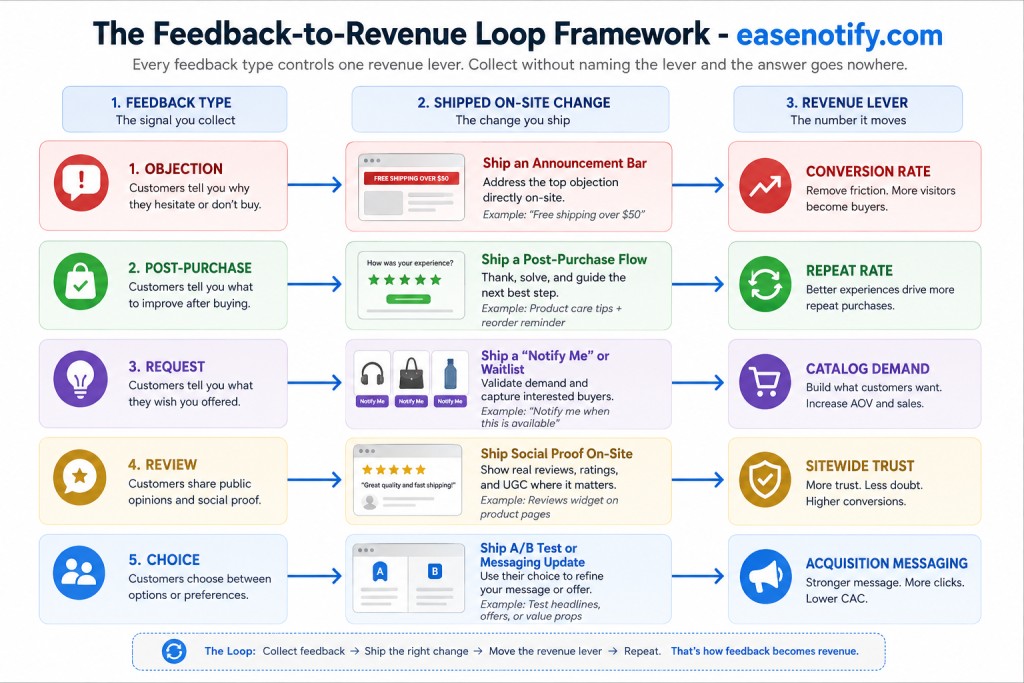
Customer feedback for sales only works when every answer you collect is attached to a revenue lever and a change you will actually ship. Feedback that lands in a dashboard, gets summarized in a monthly report, and produces no edit to a page has cost you money rather than earned it. The teams who turn feedback into revenue do one thing differently: before they ask a question, they already know which number the answer will move and which page they will change.
That gap between collecting and acting is wider than most operators believe. Bain & Company found that while 80 percent of companies believed they delivered a superior customer experience, only 8 percent of their customers agreed. The companies in that gap were not short on data. They were short on the loop that turns data into a shipped change.
EaseNotify is a website notification and announcement bar tool for Shopify and web businesses. This guide maps five distinct feedback types to the five revenue levers they each control, and names the specific on-site change each one earns. If you want the widget mechanics first, start with our website feedback widget guide. If you want the exact question wording, see exit intent survey questions. This post is about what happens after the answer arrives.
Key Takeaways
- Name the revenue lever before you write the question. A feedback question with no owning metric produces a comment you will read once and never act on.
- Objection feedback is the fastest path to revenue. Non-buyers on high-intent pages tell you what is blocking the sale, and most blockers are fixed with copy rather than code.
- Post-purchase feedback compounds because it moves retention. Harvard Business Review’s retention economics show small drops in defection producing outsized profit gains.
- Request feedback reveals demand you are not currently serving. Aggregate the requests, and the pattern becomes a product decision rather than an anecdote.
- One feedback answer should produce one shipped change within 14 days. A loop that runs slower than the sales cycle it is trying to fix stops being a loop.
What Makes Customer Feedback Actually Produce Sales?
Customer feedback produces sales when it is collected on a page where a purchase decision is being made, from a visitor whose behavior you can still influence, about a barrier you have the authority to remove. Miss any of those three conditions and you get sentiment instead of revenue.
Consider the difference between two questions. A quarterly emailed survey asking “how satisfied are you with our brand” produces a score. An on-page form asking a visitor who has sat on a product page for 60 seconds “what would you need to know before ordering this” produces a sentence you can paste into the product description that afternoon.
Both are feedback. Only one has a lever attached.
The framework below assigns each feedback type its lever. Run all five and you cover the full funnel. Run one well and you still beat a team running none.
Why Does Most Collected Feedback Never Earn a Dollar?
Three failure patterns account for nearly all wasted feedback programs.
The feedback has no owner. Responses arrive in a shared inbox or dashboard that nobody is accountable for reading. The data accumulates and ages. By the time anyone reviews it, the campaign that generated the traffic has ended.
The feedback is too general to act on. “Improve the website” is not a task. It is a mood. General questions produce general answers, and general answers cannot be converted into a specific edit. Specificity in the question is what makes the answer shippable.
The feedback arrives after the decision. Post-purchase surveys sent a week later ask people to reconstruct a decision they made in 90 seconds. PwC’s Experience Is Everything study reported that roughly one in three consumers would walk away from a brand they loved after a single bad experience. Those people are gone before your survey sends. Feedback has to be collected in the moment the experience happens.
The fix for all three is structural rather than motivational. Attach a lever, ask a specific question, and ask it on-site while the decision is live.
Type 1: Objection Feedback Moves Conversion Rate
Revenue lever: conversion rate. Shipped change: page copy or an announcement bar.
Objection feedback comes from engaged visitors who did not buy. They viewed the product, read the price, and left. Analytics records the exit. Only the visitor knows the reason.
This is the highest-yield feedback type because the objections cluster. Ask 100 non-buyers what stopped them and you will not get 100 answers. You will get four or five recurring blockers, and the top two usually account for more than half of responses.
The recurring blockers in ecommerce are consistent: unexpected shipping cost, unclear return policy, uncertainty about sizing or fit, missing payment method, and simple not-ready-yet browsing. Baymard Institute puts average documented cart abandonment at 70.19 percent, and extra cost at checkout is the leading stated reason across their research.
The critical move is what you do next. Each blocker maps to a different shipped change:
| Stated objection | Shipped change | Where it goes |
|---|---|---|
| Shipping cost too high | Free shipping threshold bar with progress | Sitewide, cart-aware |
| Unclear return policy | Returns line added above the buy button | Product template |
| Sizing uncertainty | Fit note and size chart link in-page | Product template |
| Payment method missing | Payment icons near checkout button | Cart and checkout |
| Not ready to buy | First-order incentive on second visit | Announcement bar, returning visitors |
Use Page Targeting to run the objection form only on product and cart pages, where the decision is actually live. Use Remember Dismissal so a visitor who declines to answer is not asked again on the next page. Then deliver the fix through a website announcement bar rather than waiting on a template rebuild, which is how a Tuesday insight becomes a Wednesday change.
Type 2: Post-Purchase Feedback Moves Repeat Rate
Revenue lever: repeat purchase rate. Shipped change: the confirmation page and the returning-visitor experience.
The order confirmation page is the most under-used feedback surface in ecommerce. The buying tension has resolved, the customer is engaged, and they are looking at a page with nothing else to do. Response rates here run far above any emailed equivalent.
Ask two things and nothing more. A one-tap rating on the buying experience, and one open box: “what nearly stopped you from ordering today?” That second question is the valuable one. It surfaces the friction that your buyers pushed through, which is by definition the friction your non-buyers did not.
The retention math is why this type earns its place. The foundational work by Reichheld and Sasser in Harvard Business Review established that small reductions in customer defection produce disproportionate profit gains, because retained customers cost nothing to reacquire and tend to spend more over time. Every friction point a buyer reports is a friction point that shapes whether they come back.
Configure this with a page targeting rule on the confirmation URL and an Auto-close Widget setting so the form dismisses itself if the customer ignores it. The confirmation page should feel like a thank-you, not an interrogation.
Type 3: Request Feedback Moves Your Catalog
Revenue lever: demand you are not currently serving. Shipped change: stock, bundles, or a launch.
Request feedback answers a question your analytics physically cannot: what did visitors want that you do not sell? A visitor who searches your store for a product you never stocked leaves no trace in a conversion funnel. They only exist if you ask.
Collect requests passively rather than with an interrupting prompt. A Sticky Widget docked to the side of collection and search pages, labeled plainly, catches the visitor who has just failed to find something. That is the exact moment the request is specific and top of mind.
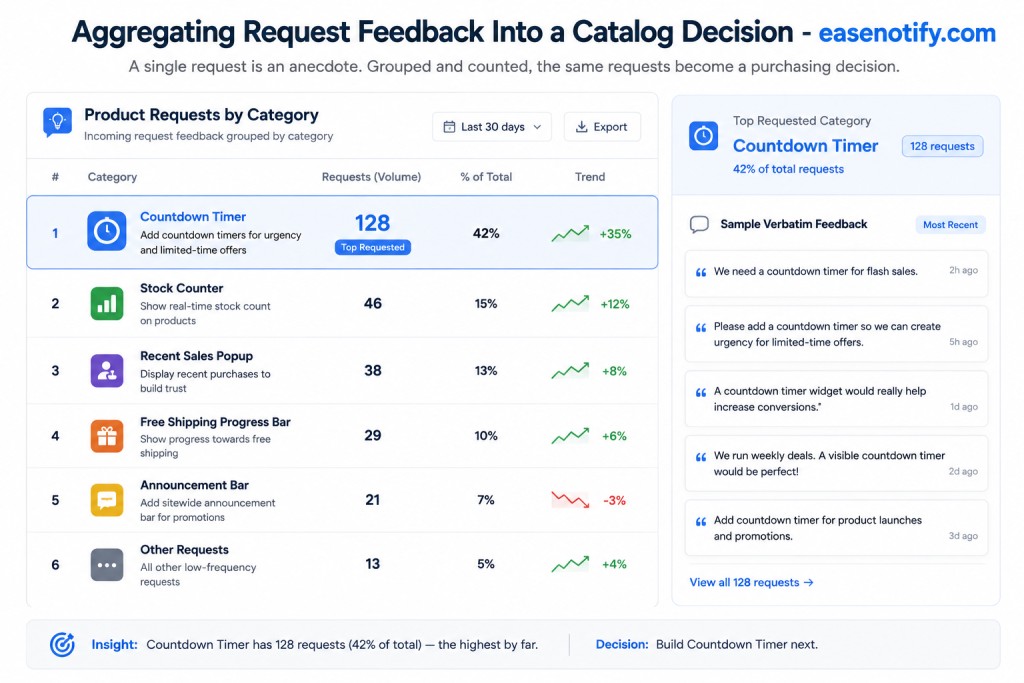
One request is an anecdote. Forty requests are a purchase order. The discipline here is aggregation: tag every incoming request by category and review the counts monthly rather than reacting to individual submissions. Patterns that clear a threshold become decisions. Everything below the threshold waits.
When a requested item does arrive, the request list is also your launch list. You now have a segment of people who asked for a specific thing, which converts far better than a general announcement. Run it as a proper product launch announcement rather than a single email, and use the Scheduling Widget to time the on-site campaign to the day stock lands.
Type 4: Review Feedback Moves Sitewide Trust
Revenue lever: conversion rate on every page at once. Shipped change: social proof placement.
The first three types improve one page at a time. Review feedback is different because a review, once collected, can be deployed everywhere. That makes it the only feedback type with compounding placement value.
The collection problem is timing. Ask for a review at purchase and the customer has not used the product. Ask two months later and the enthusiasm has faded. The window is roughly the first week after delivery, and the request has to be short.
The deployment problem is placement, and this is where most stores lose the value. Reviews sitting in a tab at the bottom of a product page are doing a fraction of the work they could do. The same content placed next to the price, next to the buy button, and near the shipping cost line addresses doubt at the moment the doubt occurs. Our guides to social proof notification examples and trust badges for ecommerce cover the placement map in full.
The practical rule: a review that answers a known objection from Type 1 should be placed directly next to where that objection occurs. If shipping cost is your top stated blocker, the review that mentions fast, reasonable delivery belongs beside the shipping line, not in a review carousel.
Type 5: Choice Feedback Moves Your Messaging
Revenue lever: acquisition efficiency. Shipped change: headlines and ad copy.
Choice feedback asks buyers a question almost nobody asks: why did you pick us over the alternative? The answer is your actual differentiator, as opposed to the differentiator your marketing page currently claims.
These rarely match. Most brands lead with the feature they are proudest of building. Customers buy for a reason that is often simpler and more mundane, and they will tell you what it is in a single sentence if asked on the confirmation page.
The value here is leverage rather than volume. A hundred responses might produce one sentence, but that sentence goes into your homepage headline, your ad copy, your product page subhead, and your announcement bar copy. It reduces what you pay to acquire every future customer, because you are now describing your product the way buyers already describe it to themselves.
McKinsey reports that 71 percent of consumers expect personalized interactions from the companies they buy from. Choice feedback is what makes segment-level personalization possible without a data science team: when you know why each segment buys, you can serve each segment a different message. Our behavioral marketing guide covers how to run that targeting on-site.
How Do You Size the Revenue From a Feedback Fix?
Feedback programs get cut because nobody attaches a number to them. Here is the arithmetic, using an illustrative store rather than a client result.
The store: 40,000 monthly sessions, 1.4 percent conversion rate, 60 dollar average order value. That is 560 orders and 33,600 dollars per month.
The feedback: An objection form runs on cart pages for four weeks and collects 120 responses. Thirty-eight percent name shipping cost as the blocker. That is the single largest cluster, and it is well ahead of second place.
The fix: A free shipping threshold bar at 75 dollars, showing live progress toward the threshold, delivered as an announcement bar rather than a template change.
The result to model: Conversion moves from 1.4 percent to 1.55 percent. That is a 0.15 point absolute gain, or roughly 11 percent relative, which is a defensible outcome for removing a top-cited blocker but is not a guaranteed one.
The math: 40,000 sessions at 1.55 percent produces 620 orders against a baseline of 560. Sixty additional orders at 60 dollars is 3,600 dollars per month, or 43,200 dollars annually, from one question and one bar.
Two honest caveats. Threshold bars also tend to move average order value upward, which this model ignores, so the figure is conservative on that axis. And a single before-and-after comparison is not proof of causation, because seasonality and traffic mix shift underneath you. Validate the lift with a proper split test before you bank the number, and read our guide to increasing average order value for the second-order effect.
The point of the exercise is not the specific figure. It is that a feedback question with a lever attached can be sized in advance, which is what gets the program funded.
The 30-Day Feedback-to-Revenue Loop
A loop that runs slower than your sales cycle is a report, not a loop. Thirty days is the working cadence.
Days 1 to 3: pick one lever. Not five. Choose the weakest number in your funnel and select the feedback type that owns it. If conversion is the problem, run Type 1. If customers do not come back, run Type 2.
Days 4 to 7: deploy one question. One question, on the pages where that decision is made, with page targeting restricting it to those pages only. Set Remember Dismissal so declining visitors are left alone.
Days 8 to 21: collect and cluster. Do not act on individual responses during this window, which is the most common mistake. Wait for the pattern. Aim for 80 to 100 responses before you group them, and expect the top two clusters to hold most of the volume.
Days 22 to 25: ship the top cluster only. One change, addressing the single largest blocker. Shipping three changes at once means you will never know which one worked.
Days 26 to 30: measure and reset. Compare the lever against its baseline, document the result whether it moved or not, then either retire the question or point it at the next-largest cluster.
Then run it again. Four loops a year against four different levers is a materially different business by December.
Frequently Asked Questions (FAQs)
Q: How do I use customer feedback to increase sales? A: Attach every feedback question to one revenue lever before you ask it, then ship one on-site change per feedback cluster. Objection feedback moves conversion rate, post-purchase feedback moves repeat rate, request feedback reveals unserved demand, review feedback improves sitewide trust, and choice feedback sharpens your acquisition messaging.
Q: How many responses do I need before acting on feedback? A: Around 80 to 100 responses is enough to see stable clustering on a single question, because objections concentrate into a handful of recurring themes rather than spreading evenly. Acting on fewer than 30 risks rebuilding your product page around one unusually vocal visitor.
Q: Where should I place a feedback form to get sales-relevant answers? A: Place it on the page where the purchase decision happens. Product and cart pages produce objection data, order confirmation pages produce retention and choice data, and collection or search pages produce product request data. Site-wide forms produce general sentiment that is difficult to act on.
Q: What is the difference between customer feedback and market research? A: Market research asks a sample of people to predict what they would do. Customer feedback asks actual visitors and buyers what they just did and why, in the moment they did it. For sales purposes the second is far more reliable, because stated intent and real behavior diverge sharply.
Q: How quickly should I act on feedback once I see a pattern? A: Within 14 days of the pattern becoming clear. Most high-value fixes are copy changes, policy clarifications, or a new announcement bar rather than engineering work, so the delay is usually organizational rather than technical.
Q: Will running feedback forms hurt my conversion rate? A: Not when they are scoped correctly. Restrict forms to relevant pages with page targeting, keep them to a single question, enable Remember Dismissal so visitors are asked once, and use auto-close so an ignored form removes itself. A form that follows a visitor across every page is the version that costs you sales.
Q: Can I run feedback collection and promotional campaigns at the same time? A: Yes, and you should, provided they are targeted to different pages or different visitor states. A common split is promotional announcement bars for first-time visitors and feedback prompts for returning visitors or exiting non-buyers, so no single visitor sees both at once.
Stop Filing Feedback. Start Shipping It.
Customer feedback for sales is not a collection problem. Almost every store already has more feedback than it acts on, sitting in dashboards, support tickets, and review replies. The problem is that the answers were never attached to a number, so nothing was ever shipped.
Pick the weakest lever in your funnel. Ask the one question that owns it, on the page where that decision is being made. Wait for the cluster, ship the top blocker, measure it, and go again.
At six dollars per month, EaseNotify Pro includes unlimited widgets, page targeting, scheduling, and response reporting, so the collect-and-ship loop runs on a single script tag. Start your free EaseNotify plan at easenotify.com and turn your next 100 answers into a change worth measuring.
Related reading:
- Website Feedback Widget: A CRO Guide — The setup, targeting, and performance side of running feedback forms on-site.
- How to Reduce Cart Abandonment — The on-site prevention window for the objections your feedback surfaces.
- Free Shipping Bar to Increase AOV — The threshold economics behind the worked example above.
- Social Proof for Ecommerce — Where to place the review feedback you collect so it answers doubt in context.
- Announcement Bar Templates — Copy you can ship the same day a feedback cluster names your top blocker.