
You already know you need an announcement bar. You have read the best practices guides. You have studied the examples. You have installed the widget. And now you are staring at a blinking cursor wondering: what do I actually write?
This is the question that separates announcement bars that drive 2-3x more engagement from ones that get ignored within seconds. The design, the placement, the timing none of it matters if the message itself does not give visitors a reason to care.
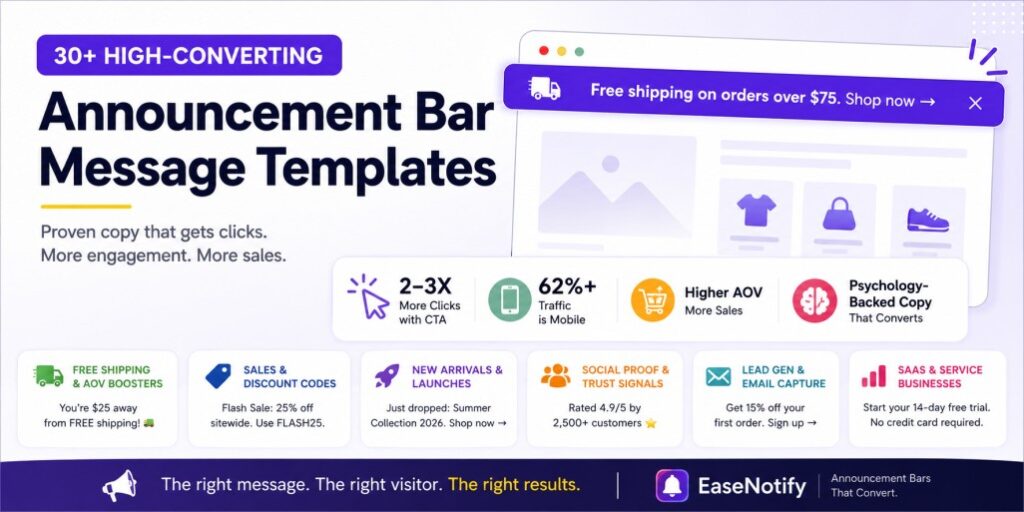
This guide gives you 30+ ready-to-use announcement bar message templates organized by goal, psychological trigger, and buyer stage. Every template is under 60 characters, mobile-tested, and built on the same copy frameworks used by high-converting ecommerce and SaaS brands.
EaseNotify is a website notification and announcement bar tool for Shopify and web businesses that lets you deploy, customize, and rotate these messages in minutes without writing code.
Key Takeaways
- Announcement bar messages must be under 60 characters (roughly 8-12 words) to avoid mobile truncation and maintain scannability.
- Clickable announcement bars with a direct CTA link get 2-3x higher engagement than static, non-linked text.
- Free shipping threshold messages are consistently the highest-converting announcement bar message type because they simultaneously drive conversions and increase Average Order Value.
- Different visitors need different messages: first-time visitors respond to welcome discounts, returning visitors respond to loyalty signals, and cart-page visitors respond to trust reassurance.
- EaseNotify’s Page Targeting lets you show different announcement bar messages on different pages, ensuring every visitor sees the most relevant copy.
- Loss aversion framing (“Don’t miss out”) outperforms gain framing (“Get 20% off”) in announcement bar copy because humans feel the pain of losing an opportunity roughly twice as intensely as the pleasure of gaining one.
What Is a Website Announcement Bar?
A website announcement bar is a slim, full-width strip fixed to the top or bottom of a web page that displays one short message to every visitor. It carries offers, shipping thresholds, countdowns, or trust signals without covering the page or interrupting what the visitor came to do.
When someone lands on your site, you have roughly three seconds to answer their biggest questions. Do you offer free shipping? Is there a discount running? Is this offer about to expire? Can I trust this store with my card details? An announcement bar answers all four at once, before the visitor has to go looking.
That is the difference between a bar and a popup. A popup blocks the page and demands a decision. A bar sits alongside the content and simply stays visible, which is why bars keep working on mobile where popups get dismissed or penalised.
The rest of this guide covers the ten most common bar types, then more than thirty message templates you can copy directly.
Why Do Most Announcement Bar Messages Get Ignored?
The average ecommerce visitor spends less than 15 seconds deciding whether to stay on a page. Your announcement bar competes for attention within that window against your hero image, navigation, and product photos. Most announcement bar messages lose this competition for three specific reasons.
They are too vague. “Check out our latest deals” tells the visitor nothing specific. There is no dollar amount, no percentage, no deadline, no product. Vague copy gets processed as noise.
They are too long. Any message over 60 characters will truncate on mobile devices, which account for over 62% of all web traffic. A truncated message is worse than no message because it signals carelessness.
They never change. A “Limited Time Offer” bar that has been running for six months trains visitors to ignore it permanently. This is banner blindness, and it is the number one reason announcement bars stop performing over time.
The fix is not design changes. It is better copy. The website announcement bar best practices post covers UX and behavioral psychology in depth, but this guide focuses exclusively on the words themselves.
10 Website Announcement Bar Examples That Convert
These are the ten bar types that do the most work across ecommerce, SaaS, and DTC stores. Each one answers a different visitor question, so pick the one matching the doubt your traffic actually has.
1. Free shipping threshold bar
Job: Increase average order value. Best for: Ecommerce and DTC brands.
“Free shipping on orders over $75”
It sets a clear buying goal, removes cost worry early, and nudges shoppers to add one more item. Make it dynamic if you can, so the message updates as the cart total climbs.
2. Coupon reminder bar
Job: Get discount codes actually redeemed. Best for: Stores running email capture.
“Your 10% code is waiting: SAVE10”
Shoppers routinely forget a code they were handed in a popup ten minutes ago. A persistent reminder keeps the incentive in view all the way to checkout.
3. Geo-targeted shipping and tax bar
Job: Remove checkout surprises for international shoppers. Best for: Stores selling across borders.
“Duties and taxes included for orders shipping to India”
Unexpected charges at checkout are one of the most common reasons carts get abandoned. Saying it upfront builds trust before the shopper has invested any effort. Global brands such as Skims commonly use this pattern on international storefronts.
4. Newsletter signup incentive bar
Job: Collect emails without a popup. Best for: Ecommerce, SaaS, and content sites.
“Get 10% off your first order. Join our list.”
It is always visible, never blocks the page, and converts the passive browser who would have closed a popup on reflex.
5. Limited-time offer countdown bar
Job: Create urgency. Best for: Flash sales, launches, and seasonal campaigns.
“Sale ends in 02:14:36”
A live timer turns a vague “soon” into a specific deadline, which is what actually moves an undecided shopper. Works especially well on landing pages.
6. Product reminder bar
Job: Recover lost intent. Best for: Stores with large catalogues.
“Still thinking about this? Ships in 24 hours.”
This works like a retargeting ad, except it runs on your own site and costs nothing. It brings a wandering visitor back to the product they were closest to buying.
7. Seasonal campaign bar
Job: Keep campaign traffic focused. Best for: Black Friday, Diwali, New Year, Cyber Monday.
“Black Friday Sale. Up to 40% off.”
Seasonal visitors arrive knowing there is an offer but not what it is. The bar closes that gap on every page they land on, not just the homepage.
8. Trust bar
Job: Build credibility before the visitor has to ask. Best for: New brands and international stores.
“No hidden fees” “30-day money-back guarantee” “Secure checkout”
A trust bar is the simplest way to answer the doubt every first-time visitor has and none of them will email you about. Trust messaging placed early is what makes the later conversion possible, which is why a trust bar often outperforms a discount for brands nobody has heard of yet.
9. Restock and availability bar
Job: Capture demand for sold-out products. Best for: Stores with fast-moving inventory.
“Back in stock. Limited units available.”
Without it, traffic arriving for a sold-out item simply leaves. With it, that same traffic converts or joins a waiting list.
10. Service status bar
Job: Cut support tickets. Best for: SaaS platforms and tools.
“Scheduled maintenance at 2 AM UTC”
“All systems operational”
Telling users before they have to ask prevents the support queue from filling with the same question.
Which one should you use?
Start with the bar that answers your most common objection. If shoppers abandon over shipping cost, run the threshold bar. If nobody has heard of you, run the trust bar. If your catalogue sells out fast, run the restock bar. One bar answering one real question beats three bars competing for attention.
The Psychology Behind High-Converting Announcement Bar Copy
Every high-performing announcement bar message exploits at least one psychological principle. Understanding these frameworks lets you write better copy systematically instead of guessing.
Loss Aversion
Behavioral economics research by Daniel Kahneman and Amos Tversky established that people feel the pain of losing roughly twice as strongly as the pleasure of gaining. In announcement bar copy, this means “Don’t miss 20% off — ends tonight” outperforms “Get 20% off today” because the first frames the discount as something the visitor will lose.
Social Proof
When people are uncertain, they look to others for guidance. A message like “Join 50,000+ happy customers” reduces purchase anxiety by signaling that thousands of other people have already validated this decision. Robert Cialdini’s research on influence identifies social proof as one of the seven core principles of persuasion.
Reciprocity
Offering something genuinely valuable first (a discount code, free shipping, a free resource) triggers an unconscious desire to reciprocate. This is why “Here’s your 15% welcome discount: WELCOME15” converts better than “Sign up for our newsletter.” The visitor receives value before being asked to give anything.
Hick’s Law (Simplicity)
Hick’s Law states that the time it takes to make a decision increases with the number and complexity of choices. An announcement bar with one message and one CTA converts dramatically better than a bar trying to communicate three different offers simultaneously.
30+ Announcement Bar Message Templates by Category
Every template below is under 60 characters, mobile-safe, and follows the copy formula: [Benefit] + [Specificity] + [Action].
Free Shipping & AOV Boosters
Free shipping messages are consistently the highest-converting announcement bar type. Baymard Institute research shows that 48% of cart abandonments happen because of unexpected shipping costs.
- Free shipping on all orders over $75. Shop now →
- You’re $25 away from FREE shipping! 🚚
- Spend $50 more to unlock free express shipping.
- Orders over $100 ship free. Always.
- Free shipping this weekend only. No minimum.
Sales & Discount Codes
Lead with the specific number. “Save 20%” outperforms “Big savings” every time because specificity builds trust and sets clear expectations.
- Flash Sale: 25% off sitewide. Use code FLASH25.
- Your 10% welcome discount is waiting: WELCOME10.
- Last chance: Sale ends at midnight tonight!
- Buy one, get one 50% off — today only.
- Save $20 on your first order. Code: FIRST20.
New Arrivals & Product Launches
These messages work best when combined with EaseNotify’s Scheduling Widget to auto-launch on release day and auto-expire after the launch window closes.
- Just dropped: Summer Collection 2026. Shop now →
- NEW: [Product Name] is finally here. Limited stock.
- Back in stock: Your favorite sold-out item is live again.
- Limited edition. Once it’s gone, it’s gone.
- Pre-order now and get 15% off at launch.
Social Proof & Trust Signals
Social proof messages are most effective on product pages and checkout pages where purchase anxiety peaks. Use EaseNotify’s Page Targeting to show trust-focused copy specifically on these high-intent pages.
- Rated 4.9/5 by 2,500+ verified customers ⭐
- Join 75,000+ happy customers worldwide.
- Trusted by [Brand Name], [Brand Name], and [Brand Name].
- 100% satisfaction guaranteed. 30-day returns.
- As featured in Forbes, TechCrunch, and Wired.
Lead Generation & Email Capture
These messages work best for first-time visitors. Pair them with a linked landing page or signup form.
- Get 15% off your first order. Sign up here →
- Join our VIP list for exclusive early access.
- Free style guide: Download our 2026 lookbook.
- Book your free consultation. Limited spots this week.
- Subscribe for weekly deals you won’t find on-site.
SaaS & Service Business Messages
For SaaS companies, product announcements, and service-based businesses, announcement bars drive feature adoption and trial conversions.
- NEW: Dark mode is here. Try it now →
- Start your 14-day free trial. No credit card required.
- Introducing [Feature Name]: Build faster, ship sooner.
- Scheduled maintenance Saturday 2 AM UTC. Details →
- Upgrade to Pro and unlock advanced reporting today.
For visual examples of these categories in action, the 15 proven website announcement bar examples showcase real brands using similar copy patterns.
Which Announcement Bar Message Should You Show Each Visitor?
Showing the same message to every visitor is the most common announcement bar mistake. Different visitors are at different stages of the buying journey, and the most effective copy matches their current mindset.
Buyer-Stage Message Matrix
| Visitor Type | Primary Mindset | Best Message Category | Example |
|---|---|---|---|
| First-time visitor | “Should I trust this store?” | Welcome discount + social proof | “10% off your first order. Join 50K+ happy customers.” |
| Returning visitor (no purchase) | “Maybe I’ll buy today” | Urgency + value reminder | “Your cart misses you. Sale ends tonight.” |
| Returning customer | “What’s new here?” | New arrivals + loyalty | “Welcome back! See what’s new this week →” |
| Product page visitor | “Is this worth the price?” | Free shipping threshold + trust | “Free shipping on orders over $75. 30-day returns.” |
| Cart/checkout visitor | “Am I making the right choice?” | Trust + urgency | “100% secure checkout. Your items are selling fast.” |
This is where EaseNotify’s Page Targeting feature transforms your announcement bar from a static billboard into a dynamic conversion layer. You can set different widgets to display on specific URLs or URL patterns:
- Show the welcome discount bar only on homepage visits.
- Show the free shipping threshold bar only on
/products/pages. - Show the trust signal bar only on
/cartand/checkoutpages.
Every page gets the right message for the right visitor at the right moment. The website announcement bar with scheduling guide explains how to combine time-based and page-based targeting for maximum impact.
How Do You Write a CTA That Actually Gets Clicked?
The CTA button (or linked text) in your announcement bar is where engagement either happens or dies. Here are the rules that separate clicked CTAs from ignored ones:
Use Specific Action Verbs
“Shop Winter Sale” outperforms “Shop Now” because it tells the visitor exactly where the click leads. “Claim My 20% Off” outperforms “Learn More” because it promises a tangible outcome.
High-CTR CTA words: Shop, Claim, Get, Save, Unlock, Discover, Start, Try, Join, Download.
Low-CTR CTA words: Click Here, Learn More, Submit, Continue, Read More.
Match the CTA to the Promise
If your announcement bar says “Free shipping on orders over $75,” the CTA should be “Shop Now” — not “Sign Up.” Every disconnect between the message and the action reduces trust and kills clicks.
Make the Entire Bar Clickable
Announcement bars where the entire strip is a clickable link consistently receive 2-3x more engagement than bars where only a small button is clickable. The larger the click target, the lower the friction.
EaseNotify’s announcement bar widget supports both full-bar clickable links and dedicated CTA buttons. Every announcement bar includes a customizable CTA button that can direct visitors straight to your sale page, product, or signup form.
How to A/B Test Your Announcement Bar Messages
Writing good copy is step one. Testing which version converts better is step two. Here is a systematic framework for testing announcement bar messages:
The Single-Variable Rule
Test only one element at a time. If you change the headline text AND the button color AND the background color simultaneously, you will never know which change drove the result.
Variables to test in priority order:
- Message copy (highest impact) — Test value-based vs. urgency-based framing.
- CTA text (high impact) — Test “Shop Now” vs. “Get My Discount.”
- Background color (medium impact) — Test high-contrast vs. brand-aligned.
- Bar position (lower impact) — Test top vs. bottom placement.
Run Tests for 7-14 Days Minimum
Short tests produce unreliable data because traffic patterns vary by day of week. Always aim for at least 95% statistical confidence before declaring a winner.
Track the Right Metrics
- Primary: Click-through rate (CTR) on the announcement bar.
- Secondary: Conversion rate on the destination page (did clicks lead to purchases?).
- Watch: Bounce rate on pages where the bar appears (is the message causing friction?).
Log Every Test
Even inconclusive tests are valuable data. Build an internal swipe file of what works and what does not for your specific audience.
5 Announcement Bar Copy Mistakes That Kill Click-Through Rates
1. Writing for Yourself Instead of the Visitor
“We’re excited to announce our new collection!” focuses on the brand, not the visitor. Rewrite as: “New collection just dropped. Shop before it sells out →” — now the visitor is the protagonist.
2. Stacking Multiple Offers
“Free shipping + 20% off + New arrivals + Join our newsletter” creates decision paralysis. Hick’s Law applies ruthlessly to announcement bars. One message, one CTA, one goal.
3. Using Vague Urgency
“Limited time offer” means nothing without specificity. When does it end? How limited is it? “Sale ends Friday at midnight” creates real urgency. A fake “limited time” message that runs for months erodes trust permanently.
4. Forgetting Mobile Truncation
Over 62% of visitors will see your announcement bar on a phone screen. If your message is 90 characters, mobile users will see a truncated version with “…” — which communicates nothing. Write under 60 characters first, then verify it reads cleanly on mobile.
5. Never Rotating Copy
The same message for weeks becomes invisible. Rotate your copy every 2-3 weeks at minimum. EaseNotify’s Scheduling Widget lets you pre-schedule different messages for different date ranges so rotation happens automatically. The scarcity marketing strategies guide covers additional rotation tactics.
How to Deploy and Rotate Messages Without Touching Code
Setting up multiple announcement bar messages with automated rotation does not require a developer.
- Sign up free at EaseNotify. The free plan includes 1 widget with 500 monthly views. No credit card required.
- Create your first announcement bar using the announcement bar widget. Pick a template, write your message (use the templates above), customize colors and CTA button in the live preview editor.
- Set Page Targeting to control which pages display each message. Product page visitors see the free shipping bar. Homepage visitors see the welcome discount.
- Set Scheduling with start and end dates for time-sensitive messages. Flash sale copy auto-launches Friday morning and auto-expires Sunday night. No manual switching needed.
- Enable Remember Dismissal so visitors who close the bar are not shown it again during their session.
- Paste one script tag into your website. Works on Shopify, WordPress, Webflow, Wix, Squarespace, Framer, Ghost, and plain HTML. Every change goes live instantly from the dashboard.
For platform-specific walkthroughs, see the Shopify announcement bar guide or the Webflow announcement bar guide.
Frequently Asked Questions (FAQs)
Q: What is a website announcement bar used for? A: It displays one short message across the top or bottom of every page, usually a shipping offer, discount, countdown, or trust signal. The goal is to answer a visitor’s most likely question before it becomes a reason to leave.
Q: Where should an announcement bar be placed? A: The top of the page is standard because it is seen first. Bottom placement works better on mobile, where a top bar competes with the browser address bar and site navigation for limited screen space.
Q: What is a trust bar? A: A trust bar is an announcement bar carrying credibility signals rather than offers, such as “secure checkout,” “no hidden fees,” or “30-day money-back guarantee.” New brands and international stores use it to answer doubts a first-time visitor will not email to ask about.
Q: How many announcement bars should I run at once? A: One. Multiple bars compete with each other and dilute the message. If you have several things to say, rotate them or target different bars to different pages rather than stacking them.
Q: What should I write on my website announcement bar? A: Write a single, specific message under 60 characters that communicates clear value. The highest-converting categories are free shipping thresholds (“Free shipping on orders over $75”), discount codes (“Save 20% with code SAVE20”), and social proof (“Rated 4.9/5 by 2,500+ customers”). Always include a clickable CTA that tells the visitor exactly what to do next.
Q: How long should an announcement bar message be? A: Keep it under 60 characters (roughly 8-12 words). Any longer and the message will truncate on mobile devices, which account for over 62% of all web traffic. Test on actual mobile devices to confirm nothing gets cut off.
Q: What is the highest-converting type of announcement bar message? A: Free shipping threshold messages are consistently the highest-converting announcement bar type. They simultaneously reduce the #1 reason for cart abandonment (unexpected shipping costs) and increase Average Order Value by motivating visitors to add more items to reach the threshold.
Q: How often should I change my announcement bar message? A: Rotate your announcement bar copy every 2-3 weeks to prevent banner blindness. For time-sensitive promotions, use EaseNotify’s Scheduling Widget to auto-launch and auto-expire messages. Align message changes with micro-campaigns, weekend flash sales, or seasonal events.
Q: Should I show the same announcement bar message on every page? A: No. Different pages serve different visitor intents. Show free shipping thresholds on product pages, welcome discounts on the homepage, and trust signals on cart and checkout pages. EaseNotify’s Page Targeting feature lets you match each page to the most relevant message.
Q: Do emojis work in announcement bar messages? A: Sparingly, yes. A single, relevant emoji (🚚 for shipping, ⭐ for reviews, 🔥 for sales) can draw visual attention and increase scannability. However, overusing emojis or using irrelevant ones makes the bar feel unprofessional. Test with and without to see what resonates with your specific audience.
Q: How do I know if my announcement bar message is working? A: Measure Click-Through Rate (CTR) as the primary metric. Track whether clicks from the bar lead to actual purchases (conversion rate). Monitor bounce rate on pages where the bar appears. A/B test one variable at a time for 7-14 days, and aim for 95% statistical confidence before declaring a winner.
Stop guessing what to write. Create your announcement bar with EaseNotify and deploy proven, high-converting messages on your store in under five minutes. Pick a template, write your copy using the frameworks above, set your targeting and schedule, and let the right message reach the right visitor on the right page.
6 thoughts on “Website Announcement Bar: 30+ Examples, Templates, Ideas”