
If you are researching how to reduce cart abandonment, you have probably already read the same advice ten times: set up an abandoned cart email, add SMS reminders, retarget with ads. All of that happens after the shopper has already left. This guide focuses on the part almost everyone skips, which is stopping the abandonment while the shopper is still on your site.
Key Takeaways
- The average cart abandonment rate is 70.19%, so for every 10 shoppers who add to cart, 7 leave without paying.
- Unexpected costs at checkout are the single biggest cause of abandonment. Surfacing shipping costs early, with a message like a free shipping bar, prevents the shock.
- Recovery emails reach only the minority of shoppers who gave you an email address. On-site prevention works on 100% of cart holders.
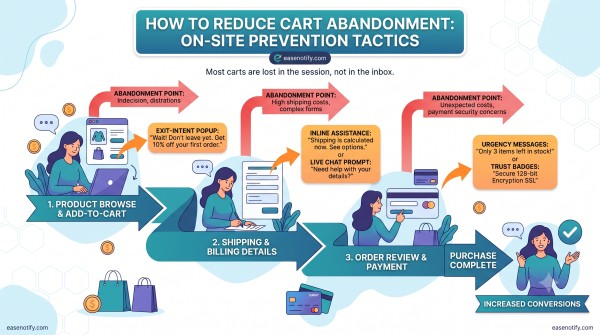
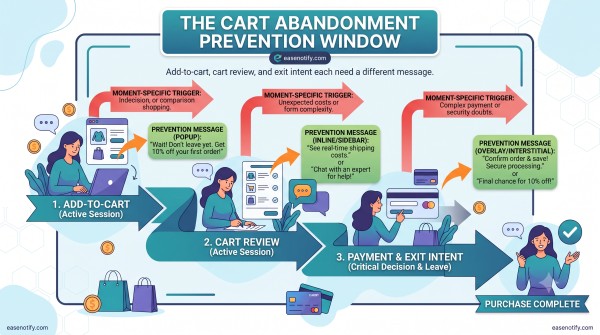
- The three highest-leverage moments are add-to-cart, cart review, and exit intent. Each needs a different message.
- Small persistent messages (announcement bars, countdown timers, progress bars) outperform aggressive popups for in-session saves.
What Is Cart Abandonment and Why Does It Happen?
Cart abandonment is when a shopper adds items to their online cart but leaves the site without completing the purchase. The Baymard Institute puts the average documented cart abandonment rate at 70.19% across industries, based on decades of aggregated checkout studies. See their ongoing research at Baymard Institute.
The reasons are remarkably consistent year over year:
- Extra costs appeared at checkout (shipping, taxes, fees)
- The site wanted account creation before purchase
- Delivery felt slow or was not stated
- The shopper was comparison browsing and drifted away
- Trust concerns about payment or returns
- A long or confusing checkout flow
Notice something about that list. Almost none of these problems can be fixed by an email sent 4 hours later. They are session problems, and they need session solutions.
Why Do Most Cart Abandonment Guides Get It Backwards?
Most guides on how to reduce cart abandonment jump straight to recovery: email flows, SMS sequences, retargeting ads. Recovery matters, but it has a structural weakness. You can only email shoppers who already gave you their address. For most stores, that is a fraction of cart holders.
On-site prevention has no such gate. Every single visitor with an item in their cart can see an on-site message. That is why prevention should come first and recovery second, not the other way around.
There is also a cost argument. Retargeting ads and SMS carry per-message costs that scale with traffic. An on-site message is built once and works on every session. EaseNotify is a website notification and announcement bar tool for Shopify and web businesses, and this always-on economics is exactly why lightweight on-site messaging is the cheapest lever in the cart abandonment stack.
The Prevention Window: 3 Moments Where Carts Are Saved or Lost
Here is a framework you will not find in the standard guides. Think of the session as three distinct moments, each with its own abandonment trigger and its own fix.
Moment 1: Add-to-cart. The shopper has committed intent but not money. The killer here is uncertainty about total cost. The fix is transparency messaging: shipping thresholds, delivery timelines, return policies, shown persistently.
Moment 2: Cart review. The shopper is weighing the decision. The killer is hesitation with no deadline. The fix is a legitimate reason to act now: an expiring discount, a shipping cutoff, low stock on a cart item.
Moment 3: Exit intent. The shopper is leaving. The killer is silence. The fix is one final, non-blocking message that gives them a reason to stay or a reason to return.
Match your messaging to the moment and you stop treating abandonment as one problem when it is actually three.
7 On-Site Tactics to Reduce Cart Abandonment
1. Show shipping costs before checkout does
Unexpected cost is the number one abandonment reason, so remove the surprise. A persistent free shipping bar that reads “Free shipping on orders over $50” answers the question before it becomes an objection. Our full guide to the free shipping bar covers seven strategies, including the dynamic progress version that updates as the cart grows.
2. Add a deadline that is real
Hesitation dies when a legitimate deadline exists. A countdown timer tied to a shipping cutoff (“Order in 3 hours for dispatch today”) or an expiring cart discount gives the shopper a truthful reason to decide now. Placement matters more than most stores realize. We break down which spots work in Shopify countdown timer placements. With EaseNotify, the Scheduling Widget controls exactly when the timer appears, so it shows during the decision, not before it.
3. Target cart and checkout pages specifically
A message that is relevant on the cart page is noise on the homepage. Page Targeting lets you show a checkout reassurance bar (“Free returns within 30 days”) only on cart and checkout URLs, where the trust question is actually being asked. The mechanics are covered in Shopify announcement bar page targeting.
4. Keep the message visible without blocking the sale
Popups at checkout are risky because they interrupt the exact flow you want completed. A Sticky Widget stays visible while the shopper scrolls through their cart without ever covering the checkout button. Research from the Nielsen Norman Group consistently finds that modal interruptions rank among the most disliked patterns on the web, which is why persistent bars beat popups for in-session messaging.
5. Respect the dismissal
A shopper who closes your urgency bar and then sees it again on the next page learns to distrust your site. EaseNotify’s Remember Dismissal setting keeps a closed message closed, and the Auto-close Widget can retire a message after a set duration so long sessions do not feel nagged. Annoyance is itself an abandonment cause. Do not create it while trying to fix it.
6. Answer the trust question with proof
Shoppers at moment two are asking “is this store legitimate?” Social proof notifications, review counts, and clear guarantee messaging answer it. Social proof for ecommerce ranks the seven types by conversion impact if you want the deep version.
7. Catch the exit without a trap
At exit intent, one calm message beats a screaming modal. A bar that says “Your cart is saved. Come back anytime, or take 10% off if you finish today” acknowledges the exit and leaves a door open. Shopify’s own checkout research pairs this with structural fixes like guest checkout and fewer form fields, which you should also implement at the platform level.
How Do You Measure Whether Your Fixes Are Working?
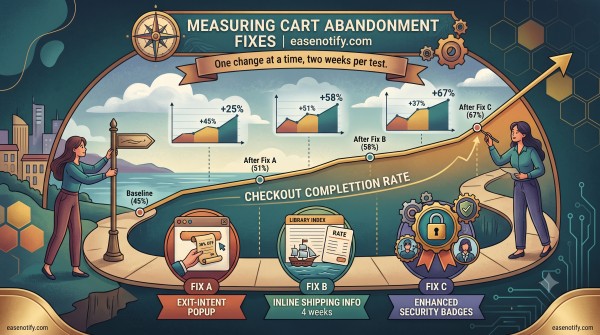
Track one number weekly: checkout completion rate (completed orders divided by sessions that added to cart). Abandonment rates have hovered around 70% globally for years, so treat anything meaningfully below your own baseline as a win rather than chasing an industry-perfect number.
Run one change at a time for at least two weeks. If you add a free shipping bar and a countdown timer in the same week, you will never know which one moved the number. For the broader measurement stack, see our guide to increasing Shopify conversion rate.
Frequently Asked Questions (FAQs)
Q: What is a good cart abandonment rate? A: The documented average is 70.19% according to Baymard Institute. Anything below 65% is better than most stores achieve. Rather than chasing a universal number, benchmark against your own store’s baseline and work to improve it month over month.
Q: How do I reduce cart abandonment without discounts? A: Fix cost transparency first. Show shipping fees, delivery times, and return policies before checkout using a persistent announcement bar. Add trust signals like guarantees and social proof on cart pages. Most abandonment comes from surprise and doubt, not from missing discounts.
Q: Do exit intent popups reduce cart abandonment? A: They can recover 5 to 10% of exiting visitors, but aggressive modals also damage trust and mobile usability. A persistent exit message or a saved-cart reminder bar achieves similar saves without interrupting shoppers who were not actually leaving.
Q: Why do shoppers abandon carts on Shopify specifically? A: The same reasons as everywhere: unexpected shipping costs, forced account creation, slow delivery, and trust doubts. Shopify stores can fix most of this with guest checkout, Shop Pay, transparent shipping messaging, and page-targeted reassurance bars on cart and checkout pages.
Q: How fast do on-site changes reduce cart abandonment? A: Immediately, because they affect every live session from the moment they go live. Measurable statistical impact typically takes two weeks of data. Email recovery flows, by contrast, only reach the subset of shoppers who submitted an email address.
Q: What is the difference between cart abandonment and checkout abandonment? A: Cart abandonment includes everyone who added an item and left. Checkout abandonment counts only shoppers who began the checkout process. Checkout abandoners are higher intent, so prioritize fixing that segment first with transparency and trust messaging.
Cart abandonment is not one problem. It is three moments, and each one can be answered with the right message at the right time. EaseNotify gives you the announcement bars, countdown timers, and targeting controls to cover all three, starting free, with Pro at $6 per month.
Start your free EaseNotify plan at easenotify.com.
3 thoughts on “How to Reduce Cart Abandonment: Fix the Session, Not Just the Follow-Up Email”