
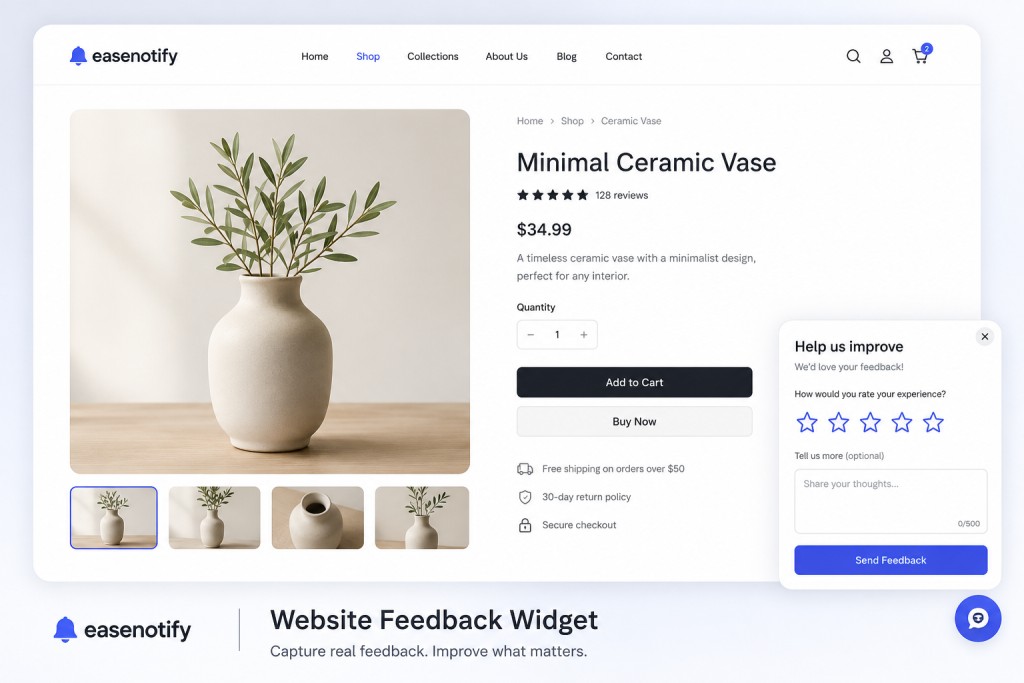
A website feedback widget is the single most diagnostic tool a site owner can deploy, because it targets the ninety-eight percent of traffic that leaves a website without converting or saying why. While standard analytics tools show where users drop off, only direct feedback reveals the specific friction points, broken layout elements, or missing information causing those drop-offs. By capturing visitor opinions in the moment, you convert silent exits into actionable optimization tasks.
According to research from HubSpot, companies that actively gather and act on customer feedback see customer retention rates increase by up to fifteen percent. The average ecommerce conversion rate sits around 1.4 percent according to Baymard Institute studies. Improving that benchmark requires more than just launching new ads: it requires identifying the hidden conversion blockers that cause visitors to abandon their carts.
EaseNotify has introduced a website feedback widget to its conversion toolset. This guide covers how to use on-site feedback forms to capture customer satisfaction (CSAT) ratings, net promoter scores (NPS), bug reports, and suggestions, all without slowing down your pages.
Key Takeaways
- Feedback widgets provide the diagnostic data that analytics tools miss. Google Analytics shows where visitors leave, but a feedback form explains the user intent and friction behind the exit.
- Emoji and star ratings increase response volume by up to three times. One-tap ratings reduce user friction, making it simple for visitors to share their thoughts compared to long, multi-page surveys.
- Exit-intent triggers capture the exact cause of cart abandonment. Displaying a targeted feedback form on the checkout page right before a visitor exits captures immediate, high-intent friction data.
- Specialized, single-script tools prevent performance degradation. Using lightweight widgets ensures that collecting feedback does not drag down mobile page load speeds or harm search engine visibility.
- Zero-party data collection prepares brands for privacy-first marketing. Collecting direct feedback is the most reliable way to understand customer preferences as tracking cookies phase out.
What Is a Website Feedback Widget?
A website feedback widget is a small, modular application embedded into a web page that enables visitors to rate their experience, report bugs, or submit suggestions without navigating away from the page. These widgets are usually positioned as a floating tab in the corner of the viewport or triggered as a polite popup based on user behavior. They act as a direct channel of communication between the website operator and the visitor.
Historically, collecting customer sentiment required redirecting visitors to external survey pages or sending post-purchase emails. A modern website feedback widget processes everything on-site. Visitors can select a rating option (such as stars, thumbs up/down, or emojis) and optionally write a short comment in a single interface. This instant capability yields significantly higher response rates, providing a richer data pool for conversion rate optimization.
Unlike a full-page survey, the widget respects the user journey. It does not demand a long commitment. A visitor experiencing a broken link can report it in three seconds. A customer confused by shipping policies can submit a query before closing the tab. This contextual data collection is what makes on-site widgets an essential layer of any digital growth strategy.
Why Your Website Needs a Feedback Widget
Most businesses focus their conversion rate optimization efforts entirely on persuasive widgets. They install a social proof widget or display a countdown timer to build urgency. While these tools are highly effective, they only address the emotional triggers of the buyer. They do not fix underlying usability errors or lack of clarity. A feedback form serves a different purpose: it is diagnostic.
Usability research by the Nielsen Norman Group highlights that user feedback is critical for exposing mismatches between website design and user expectations. A developer might test a page on a modern desktop browser, but a feedback widget might receive reports from mobile users on older operating systems stating that the checkout button is unclickable. Without a widget, those mobile users leave silently, and the merchant loses sales indefinitely.
Here is how a feedback widget directly supports website growth:
1. Eliminating Guesswork in Design Changes
When a product page suffers from high bounce rates, marketing teams often brainstorm potential issues. They might redesign the layout, rewrite the copy, or change the images. A feedback widget removes this trial-and-error cycle. By placing a widget on the low-performing page, you can ask, “Is there anything preventing you from buying today?” The responses might reveal a simple barrier: visitors do not understand your return policy. You can then write a clear return policy instead of spending thousands on a page redesign.
2. Identifying Technical Bugs in Real Time
No matter how thorough your pre-launch testing is, bugs will slip through to production. Payment gateways crash, discount codes fail to apply, and forms break. A visitor who encounters a bug will rarely search for your contact page to write an email. Instead, they will close the tab and shop with a competitor. A floating feedback tab provides a low-friction channel to report bugs immediately. When multiple users submit reports about the same issue, your team can resolve it before it damages daily revenue.
3. Collecting High-Value Zero-Party Data
Zero-party data is information that a customer intentionally and proactively shares with a brand. As privacy regulations tighten and third-party tracking cookies disappear, this data becomes the foundation of personalization. A website feedback widget collects zero-party data organically. You learn what features customers want, what products they are looking for, and what elements they value most. This information can then shape your product development, inventory management, and marketing campaigns.
5 Proven Strategies to Increase Conversions with Feedback Widgets
Simply embedding a feedback widget is not enough to guarantee a conversion lift. The timing, placement, and question framing must align with the specific intent of the page. Here are five proven strategies to deploy website feedback widgets contextually:
Strategy 1: Page-Targeted Exit Surveys on Checkout Pages
Cart abandonment is the largest leak in the ecommerce funnel. While displaying a free shipping bar or a Shopify countdown timer can reduce abandonment, some users will still try to leave. An exit-intent feedback survey can capture the exact reason why.
Configure your widget using page targeting to load exclusively on checkout pages. Set the trigger to activate only when the user moves their cursor toward the close button. Ask a single question: “What stopped you from completing your order today?”
Keep the options brief:
- Shipping cost was too high
- Payment method failed
- Not ready to buy yet
- Checkout form was too complicated
This data will tell you whether you need to offer better shipping rates, add new payment methods like shop pay, or simplify the checkout steps.
Strategy 2: Floating Feedback Tabs on Category Pages
Category pages help users browse your product range, but if the filtering or navigation is confusing, visitors will get overwhelmed. A floating feedback tab on these pages acts as a permanent suggestion box.
Keep the widget closed as a small tab reading “Feedback” or “Help Us Improve” on the side of the screen. Visitors who get stuck can click the tab to open a short comment box.
This passive placement ensures you gather valuable data from frustrated shoppers without interrupting the search flow of users who are browsing successfully. If visitors complain that they cannot find a specific filter (like size or color), you can update your sidebar options to improve usability.
Strategy 3: Post-Purchase Satisfaction (CSAT) Loops
The checkout success page is the best place to collect customer feedback because the buying tension has resolved. The customer is happy, engaged, and receptive to questions.
Set a page targeting rule to show the widget only on the order confirmation page (e.g., /checkout/thank-you). Trigger the widget immediately upon load. Use a simple star rating to measure the overall purchasing experience: “How easy was it to shop with us today?” Follow the rating with a single open-ended comment box: “What can we do to make it even better next time?”
This strategy helps you measure your checkout usability baseline and isolate shipping or packaging worries before they become support tickets.
Strategy 4: Timed Surveys on Complex Landing Pages
If your website features long-form landing pages for services or subscription programs, visitors must digest a significant amount of information. If the copy is unclear or fails to answer their questions, they will leave without converting.
Use a timed trigger to display the feedback form after a visitor has spent at least forty-five seconds on the page. This delay ensures that you are only asking engaged readers who have had time to evaluate your offer. Ask: “Does this page answer all of your questions?”
If visitors select “No,” provide a text box where they can type what is missing. Use this data to update your FAQ sections or clarify your value proposition.
Strategy 5: Dynamic Rating Widgets on Blog Content
Content marketing is an expensive investment. To ensure your blog posts are actually helping visitors, you must measure their utility.
Place a feedback widget at the bottom of your blog articles. Use a simple thumbs up or thumbs down rating: “Was this article helpful?” This setup functions as a real-time content audit.
If a specific article receives a high volume of thumbs down ratings, it signals that the content is outdated, inaccurate, or fails to satisfy the search intent. You can then apply a content refresher strategy to update the post, add new data, and restore its quality score.
Specialized vs. Aggregated: Why Lightweight Widgets Win
Many business owners turn to massive widget libraries when they need to add features to their website. These aggregators offer dozens of different widgets, from weather apps to social media feeds, under a single subscription. While this approach seems convenient, it introduces a severe performance penalty.
Aggregated widget platforms are built on heavy legacy frameworks. When you load a single form widget from their script, the browser must often download and parse the code for all ninety other widgets in their catalog. This resource loading creates render-blocking JavaScript, increases cumulative layout shift, and hurts your Core Web Vitals.
In contrast, specialized tools like EaseNotify operate on a conversion-focused, lightweight architecture. The EaseNotify script loads only the specific code required for your active campaigns. Whether you run an announcement bar, a countdown timer, or a website feedback widget, the code remains exceptionally lean.
According to search engine optimization benchmarks, every additional hundred milliseconds of page load speed can reduce conversion rates by seven percent. Choosing a specialized conversion tool ensures that your feedback collection does not drag down your mobile loading speeds or hurt your organic ranking.
For a detailed analysis of page performance under widget load, review our guide on announcement bar page speed Shopify sites.
Technical Setup: Implementing Your Widget in Under 2 Minutes
EaseNotify makes it easy to design, configure, and launch a feedback widget without editing complex code. The setup process is designed to take under two minutes:
Step 1: Design Your Form in the Dashboard
Log into your EaseNotify account and create a new campaign. Select the feedback widget template. Choose your preferred rating format: stars, emojis, or thumbs. Write your primary question and customize the design to match your website styling. You can adjust background colors, button designs, and text fonts to align with your brand identity.
Step 2: Configure Your Targeting Rules
Use the advanced widget settings to control exactly where and when your form appears:
- Page Targeting: Restrict the widget to specific URLs (such as
/checkout/) or show it site-wide. - Scheduling Widget: Set the campaign to run only during specific promotional periods or office hours.
- Auto-close Widget: Configure the popup to dismiss itself after a set duration if the user does not interact with it.
- Remember Dismissal: Enable this feature to set a cookie when a user closes the widget. This ensures the user is not bothered by the form again during their session.
- Sticky Widget: Keep the feedback tab docked to the corner of the screen as the user scrolls, maintaining a subtle presence.
Step 3: Paste the Script Tag
Copy the single line of JavaScript provided in the EaseNotify dashboard. Paste this script into your website template header or tag manager. The feedback widget will go live instantly. All submissions are captured, parsed, and displayed in your centralized dashboard in real time.
Frequently Asked Questions (FAQs)
Q: What is a website feedback widget? A: A website feedback widget is a small, embeddable on-site form that allows visitors to rate their user experience, report bugs, and submit suggestions directly on a web page. It helps site owners discover usability issues and improve conversion rates by explaining why visitors leave.
Q: Can I customize the questions and design of the feedback form? A: Yes. EaseNotify allows you to customize the primary question, text fields, rating icons (emojis, stars, or thumbs), and visual branding. You can change colors, button styles, and corner alignments to ensure the widget matches your website theme.
Q: Will adding a feedback widget slow down my website load times? A: Not if you use a lightweight conversion specialist like EaseNotify. Unlike massive, bloated widget aggregators that load legacy frameworks, EaseNotify uses a single optimized script file to deliver clean, fast performance that protects your Core Web Vitals.
Q: What is the best trigger for an exit-intent survey? A: The most effective trigger is cursor trajectory detection. When the user moves their mouse toward the browser address bar or close button, the widget pops up. This captures the visitor right before they leave, allowing you to ask why they are abandoning their session.
Q: Can I schedule my feedback widget to only show at specific times? A: Yes. With the EaseNotify Scheduling Widget, you can define exact start and end dates or set weekly schedules for your feedback campaigns. This is ideal for coordinating surveys with marketing launches or customer service availability.
Q: Where are the feedback responses stored and how can I view them? A: All user ratings, written comments, and submission metadata (like the source page URL and timestamp) are captured and organized in your EaseNotify dashboard. You can view, filter, and track these responses to identify conversion patterns.
Q: Does EaseNotify work on Shopify, WordPress, and Webflow? A: Yes. EaseNotify is platform-independent. You only need to copy and paste a single script tag into the head section of your site. It works on Shopify, WordPress, WooCommerce, Webflow, Squarespace, Wix, Framer, and custom HTML.
Turn Silent Visitors into Insights
Stop guessing why your visitors are bouncing. A static website leaves you in the dark, but a website feedback widget shines a light on the exact reasons why shoppers choose not to buy. By collecting real-time CSAT ratings, bug reports, and exit intent surveys, you gain the precise data needed to refine your user experience and boost conversions.
At six dollars per month, EaseNotify Pro offers unlimited widgets, page targeting, and dashboard reporting. Start your free EaseNotify plan at easenotify.com to begin listening to your customers and building a high-converting website today.
2 thoughts on “Website feedback widget: 5 ways to turn silent visitors into conversion data”