

Popups work. That is the uncomfortable truth that makes them hard to give up.
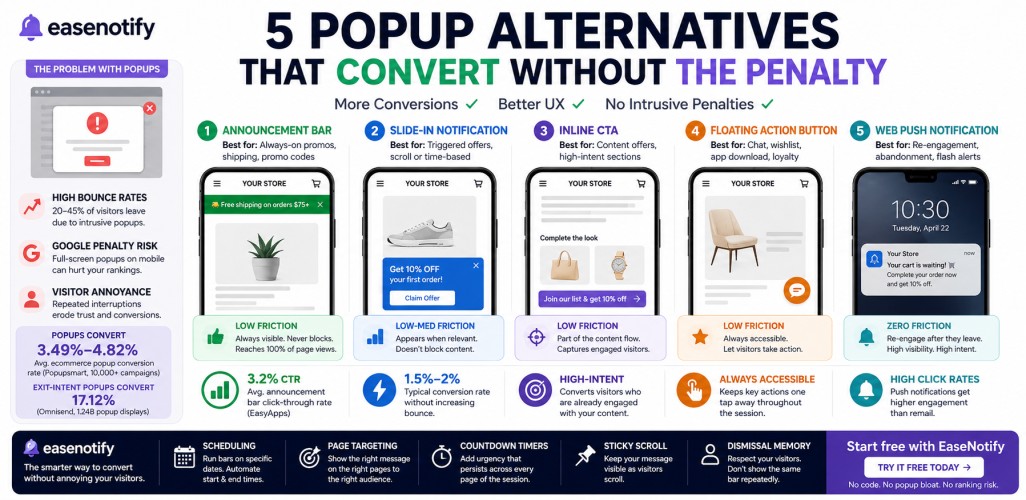
The average popup conversion rate across ecommerce is 3.49-4.82%. Exit-intent cart abandonment popups convert at 17.12% on average. Those numbers are real, and they explain why popups became the default tool for email capture, cart recovery, and discount distribution across virtually every Shopify store.
But popup performance is only half the equation.
The other half is what popups cost: higher bounce rates from impatient mobile visitors, potential ranking penalties from Google’s mobile interstitials policy, and accumulated visitor annoyance that erodes trust on every return visit. For stores where mobile traffic is the majority and organic search is the primary acquisition channel, those costs compound quickly.
This guide covers 5 popup alternatives for ecommerce that deliver conversion results without the friction, the SEO risk, or the UX damage. The goal is not to replace every popup — it is to match the right format to the right conversion job, and stop using the wrong format where it is actively working against the store.
Key Takeaways
- Popups average 3.49-4.82% conversion but create disproportionate friction on mobile and can trigger Google’s intrusive interstitials penalty for pages visited from mobile search.
- Announcement bars are the most widely applicable popup alternative: persistent, non-blocking, session-wide, and fully exempt from Google’s mobile penalty.
- Five formats cover different conversion goals: announcement bars for always-on promotions, slide-in bars for triggered offers, inline CTAs for high-intent page sections, floating action buttons for persistent access, and web push for post-session re-engagement.
- The popup vs announcement bar choice is not binary. High-converting stores use an announcement bar for persistent messaging and reserve popups for exit-intent and time-delayed trigger moments only.
- EaseNotify is built specifically for the announcement bar side: scheduling, page targeting, countdown timers, sticky scroll, and dismissal memory — no code required.
Why Ecommerce Stores Are Rethinking Popups
The case against popups is not that they do not convert. It is that they convert poorly in specific conditions that happen to describe most ecommerce traffic in 2026.
Mobile traffic is now the majority of ecommerce sessions. When a visitor on a mobile device lands on a product page and immediately hits a full-screen popup covering the item they tapped to see, the friction is proportionally larger than on desktop. A popup covering 40% of a desktop viewport covers 100% of a mobile screen. The close button is smaller. The dismiss path is longer. The interruption lands harder — and bounce happens faster.
Google penalizes intrusive popups on mobile. Since January 2017, Google’s search algorithm has applied a ranking signal to pages that display content-blocking interstitials to visitors arriving from mobile search. A store running a full-screen popup triggered immediately on mobile page load from a Google result is actively working against its own organic rankings. (Full breakdown in section 4.)
Popup fatigue compounds over return visits. A first-time visitor may engage with an email capture popup. A visitor on their third return visit who has already dismissed it twice will dismiss it faster each time and start associating the offer with interruption rather than value. A popup converting at 4% in month one commonly falls to 1-2% by month six — not because the offer changed, but because habitual dismissal becomes automatic.
None of this means popups should be abandoned. Exit-intent popups triggered when a visitor moves toward the back button are still the highest-converting format for cart abandonment recovery at 17.12% Omnisend, 1.24 billion popup display study. Time-delayed popups on high-intent product pages target engaged visitors, not first-load arrivals. The problem is using popups where alternatives perform better at lower cost — and most stores are doing exactly that for their always-on promotional messaging.
What Makes a Good Popup Alternative?
Not every notification element qualifies as a genuine popup alternative for ecommerce. A real alternative satisfies three conditions:
1. It must convert at a comparable or better rate for its specific conversion goal. An alternative that looks cleaner but drives zero action is a decoration, not a conversion tool.
2. It must not block or delay access to primary page content. The core problem with intrusive popups is that they stand between the visitor and what they came to see. A real alternative leaves the content accessible from the first second.
3. It must be targetable, schedulable, or triggerable by visitor behavior. The power of a popup is its specificity. An alternative that cannot be targeted to specific pages, visitor states, or time windows loses most of what makes the popup format effective.
The five formats below meet all three conditions. Each one addresses a different conversion goal where popups are frequently overused or misapplied.
5 Popup Alternatives for Ecommerce (Ranked by Use Case)
1. Announcement Bar (Best for: Always-on promotions, shipping thresholds, promo codes)
An announcement bar is a thin horizontal strip at the top or bottom of every page. It delivers a single message to every visitor across every page of their session without blocking content, requiring a dismiss action, or demanding attention the visitor has not offered.
The announcement bar is the highest-volume popup alternative because its reach is session-wide. A 3.2% CTR on an announcement bar applies to every page view in a session, not just the visitors who trigger a popup condition. At 5,000 monthly sessions averaging 3 pages per session, a 3.2% CTR generates 480 clicks from a single bar running a single offer.
Best use cases:
- Free shipping threshold (visible on every product and cart page)
- Active promo code during a sale window (visible across the full session)
- Countdown timer during a flash sale (persistent urgency on every page)
- Trust signal on landing pages (review count, press mention, customer milestone)
- Mobile sessions where full-screen popups create friction on arrival from search
For the full comparison of announcement bars and popups by conversion goal, the announcement bar vs popup breakdown covers the data and the specific scenarios where each format wins.
2. Slide-In Notification (Best for: Triggered offers, content upgrades, scroll-depth activations)
A slide-in notification appears from the bottom corner of the screen after a behavioral trigger: scroll depth, time on page, or a specific click event. It does not block the main content. The visitor can continue browsing while the notification is visible.
Slide-ins convert lower than full-screen popups because they compete for attention without forcing it. But for stores where popup friction is driving mobile bounce, a slide-in converting at 1.5-2% with zero bounce increase frequently outperforms a popup converting at 4% while raising bounce by 12-15%.
Best use cases: post-scroll discount reveals (after 60-70% scroll depth), content upgrade offers mid-article, post-purchase review requests on order confirmation pages.
3. Inline CTA (Best for: Content-adjacent offers, high-intent page sections, blog conversions)
An inline CTA is embedded directly in the page content — below a product description, at the end of a blog post, or between sections of a landing page. No overlay, no trigger, no dismiss action. The visitor encounters it as a natural part of the content flow.
Inline CTAs do not interrupt. They capture visitors who have already engaged deeply enough with the content to be genuinely interested. A well-placed inline CTA at the bottom of a high-intent product description targeting visitors who have read the full page competes at a different conversion level than a popup shown to every page-load visitor regardless of intent.
Best use cases: blog post email captures after value-establishing content, product page loyalty enrollment below the description, landing page form after the offer has been fully explained.
4. Floating Action Button (Best for: Persistent access, chat, wishlist, app download)
A floating action button is a persistent element fixed to a corner of the screen that remains accessible as the visitor scrolls. It does not interrupt, does not block content, and does not require engagement. It simply stays available for visitors who want to act.
Floating buttons work best for soft conversions: live chat initiation, wishlist saves, app download prompts, or loyalty program enrollment. They are not a direct substitute for email capture popups but are highly effective at maintaining conversion access throughout a long session without any interruptive cost.
5. Web Push Notification (Best for: Re-engagement, cart abandonment follow-up, flash sale alerts to opted-in subscribers)
Web push notifications require an explicit opt-in but reach visitors after they leave the site. Unlike popups, which are limited to the active session, push notifications can recover abandoned carts hours or days later.
The opt-in rate for push is lower than for email popup captures (typically 5-10%), but the re-engagement rate is high. Ecommerce push notifications consistently show click rates above email for time-sensitive alerts because of near-instant delivery and visibility outside the inbox. Best use: cart abandonment follow-up (24-48 hours), back-in-stock alerts, and flash sale alerts to opted-in subscriber lists.
he Google Mobile Penalty Most Stores Don’t Know About
Google’s intrusive interstitials policy applies a negative ranking signal to pages that display content-blocking interstitials to visitors arriving from mobile search. The policy has been active since January 2017 and applies to organic mobile search rankings.
Formats that trigger the penalty:
- Full-page popups that appear immediately when a visitor arrives from a Google mobile search result
- Overlays covering the main content on mobile before the visitor can interact with the page
- Interstitials requiring dismissal before the content is accessible (excluding legally required formats: age verification, cookie consent, login walls)
Formats that do NOT trigger the penalty:
- Announcement bars (they occupy a fixed strip and do not block the main content area)
- Slide-in notifications positioned outside the main content
- Time-delayed popups appearing after a visitor has had time to engage with the page
- Exit-intent popups triggered by departure behavior, not page load
This matters directly for any store using organic search as a primary acquisition channel. Running a full-screen email capture popup triggered on first mobile page load is simultaneously hurting rankings on the channel driving the traffic. Replacing that specific popup with an announcement bar for the always-on promotional message eliminates the penalty risk without removing conversion coverage.
The key distinction: the penalty applies to popups shown immediately on page load to visitors arriving from mobile search — not to popups used in all contexts. An exit-intent popup or a 45-second-delayed popup on a product page does not trigger the penalty because it is not blocking content at the moment of arrival.
Search Engine Land has tracked every confirmed update to this policy since its introduction. The current guidance in Google’s developer documentation is explicit: the penalty is limited to interstitials that make content less accessible, not to every overlay format used anywhere on a page.
Which Popup Alternative Should You Use?
The format decision comes down to conversion goal, visitor state, and traffic source.
| Conversion Goal | Visitor State | Recommended Format |
|---|---|---|
| Always-on promo code or shipping threshold | All visitors, all pages | Announcement bar |
| Flash sale urgency across the full session | All visitors during the sale window | Announcement bar with countdown timer |
| Email capture with incentive | First-time visitors, early session | Time-delayed popup (30-60s) or slide-in |
| Cart abandonment recovery | Visitors about to exit with cart items | Exit-intent popup |
| Trust signal on high-traffic landing pages | New visitors from ads or search | Announcement bar (social proof) |
| Post-session re-engagement | Opted-in past visitors | Web push notification |
| High-intent content offer | Blog readers who reached end of post | Inline CTA |
| Chat or wishlist access | All visitors throughout session | Floating action button |
The most common misalignment in ecommerce is using popups for always-on messaging: free shipping thresholds, permanent promo codes, and sitewide trust signals. These are persistent messages that should be visible across the full session at every decision point — exactly what an announcement bar delivers, without friction and without the penalty risk on mobile traffic from search.
For stores running a popup for every conversion goal, the shift is not about removing popups. It is about assigning the announcement bar to the persistent-messaging jobs it handles better, and keeping popups for the high-intent exit and engagement moments where the interruption earns its conversion rate.
How EaseNotify Handles the Non-Intrusive Side
EaseNotify is a website notification and announcement bar tool built specifically for Shopify merchants and web businesses. Every feature is designed for the announcement bar side of the conversion setup: persistent, non-blocking, targetable, and schedulable.
Key features for stores shifting from popup-heavy to announcement-bar-first setups:
- Scheduling Widget: Assign specific bars to specific date ranges. Flash sale bars expire automatically when the sale ends. No manual removal, no expired deal running while you sleep.
- Page Targeting: Show a free shipping bar on product and cart pages, a social proof bar on landing pages, a countdown bar on sale collection pages. Different message, different page, different conversion goal — all from one tool.
- Sticky Widget: Keep the bar visible throughout the full session as visitors scroll past the fold. Unlike a popup shown once, the announcement bar stays present at every decision point in a session.
- Countdown Timer Widget: Embed a live countdown directly into the announcement bar for flash sales and expiring offers. Persistent visual urgency across every page without the UX cost of a popup countdown.
- Remember Dismissal: Prevent the same bar from reappearing after a visitor dismisses it. Returning customers see a fresh message, not a repeated offer they already ignored.
- Auto-close Widget: Dismiss informational bars automatically after a set duration for visitors who have already read the content, without requiring an explicit close action.
For a full guide covering 9 high-converting announcement bar formats and when to use each, the ecommerce notification bar guide covers the complete setup by campaign type. For copy, the announcement bar messages guide has 30 ready-to-use templates organized by goal.
For the broader website announcement bar setup — covering sticky behavior, mobile optimization, and format selection — the website announcement bar guide covers the full implementation in detail.
Frequently Asked Questions (FAQs)
Q: What is the best popup alternative for ecommerce? For always-on promotions, free shipping thresholds, and promo codes, an announcement bar is the best popup alternative for ecommerce. It reaches 100% of page views across every session without blocking content, without friction, and without triggering Google’s mobile interstitials penalty. For email capture and cart abandonment recovery, time-delayed and exit-intent popups remain the right format when triggered correctly.
Q: Do popup alternatives convert as well as popups? Announcement bars average 3.2% CTR across all session page views — comparable to the 3.49-4.82% average popup conversion rate, but applied to a significantly larger pool. A popup reaches only the visitors who trigger its specific condition. An announcement bar reaches every page view in every session. For persistent promotional messages, announcement bars frequently generate more total clicks than popups despite the similar percentage rates.
Q: Will replacing popups with announcement bars hurt my email list growth? Not if you keep email capture popups in the formats that are safe and effective: time-delayed (30-60 seconds) and exit-intent. These do not trigger Google’s mobile penalty and convert at high rates because they target engaged visitors rather than first-load arrivals. The announcement bar handles persistent promotional messaging. Targeted popups handle email capture. The two are not in competition.
Q: Are announcement bars affected by Google’s popup penalty? No. Google’s intrusive interstitials penalty applies specifically to content-blocking interstitials that prevent access to the main page content. An announcement bar occupies a fixed strip at the top or bottom of the page and does not block the main content area. It is not classified as an intrusive interstitial and does not trigger the ranking signal.
Q: Can an announcement bar replace a popup for the same offer? For most always-on promotional offers, yes. Free shipping thresholds, active promo codes, countdown timers during flash sales, and trust signals are all well-suited to an announcement bar that delivers the message persistently without interruption. Email capture that requires a form submission and gated content behind an email wall still require a popup format — a bar cannot handle the form interaction. The announcement bar handles the persistent-messaging layer. Popups handle the high-intent interruption layer.
Q: What popup alternative works best on mobile? An announcement bar is the highest-performing popup alternative for mobile ecommerce sessions. It occupies 40-60 pixels at the top of the screen without blocking any content, does not trigger Google’s mobile interstitials penalty, and delivers its message at every decision point in the session. Full-screen popups are the worst-performing format on mobile because they block the entire viewport, create a larger dismiss task on a smaller touch target, and are most likely to drive immediate bounce.
Q: What is the best announcement bar popup alternative tool for Shopify? EaseNotify is built from the ground up for Shopify merchants and web businesses with native support for scheduling, page targeting, countdown timers, sticky scroll behavior, and dismissal memory. For a full comparison of announcement bar tools for Shopify by feature set, the best announcement bar tools guide covers the options in detail.
The Bottom Line
Popups are not the problem. Using popups for every conversion goal — including the ones where a non-intrusive format performs better — is the problem.
A full-screen popup on first mobile page load from a Google result hurts rankings and drives bounce simultaneously. An announcement bar delivering the same free shipping offer runs persistently across every page of the session, reaches 100% of page views, and does not trigger the penalty or the friction that turns a visitor into a bounce.
The stores converting consistently are not choosing between popups and alternatives. They are assigning the right format to the right job: announcement bars for always-on persistent messaging, popups for high-intent exit and engagement moments, and nothing blocking a mobile visitor who just arrived from organic search.
EaseNotify handles the announcement bar side. Bars, countdown timers, and website widgets for Shopify merchants and web businesses. No code. No popup bloat. No rankings damage from formats that were built for desktop in 2015.
Want more? Upgrade today to the PRO version.

2 thoughts on “Popup Alternative for Ecommerce: 5 Formats That Convert Without the Penalty”