
FOMO marketing examples for ecommerce are easy to list. Countdown timers. Low stock alerts. “Only 3 left.” What separates stores that convert at 3 percent from stores stuck at 1.3 percent is not knowing the list. It is deploying each FOMO tactic at the right page, at the right session stage, with copy tied to a real constraint.
Fear of missing out is not a buzzword. It is a documented mechanism in consumer psychology, and the ecommerce stores that build FOMO into their on-site infrastructure are capturing the revenue that everyone else is handing back to the ad platform.
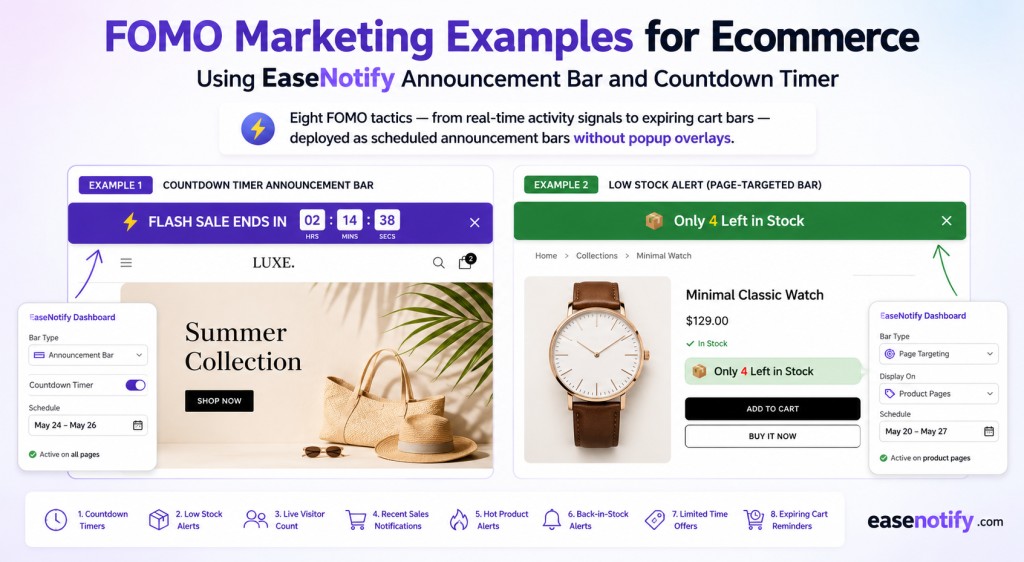
Key Takeaways:
- The 8 highest-converting FOMO marketing examples for ecommerce are: flash sale countdown bars, low stock alerts, limited-edition launch bars, free shipping deadline bars, expiring cart messages, social proof notification bars, early access windows, and seasonal deadline bars.
- The most effective FOMO tactics are authentic — tied to real deadlines, real inventory, and real thresholds. Fabricated urgency gets detected and destroys brand trust faster than it generates conversions.
- Each FOMO tactic should be matched to a specific session stage and page context. Early-visit FOMO (social proof, launch bars) differs from exit-stage FOMO (expiring cart, last-chance deadlines).
- EaseNotify deploys six of these eight examples via scheduled announcement bars, countdown timers, and page-targeted notification widgets — no popups, no developer involvement.
- At $6 per month, EaseNotify Pro gives Shopify stores a full FOMO infrastructure at the cost of a single recovered cart.
What Is FOMO Marketing in Ecommerce?
FOMO marketing is the practice of using fear-of-missing-out triggers — scarcity, time limits, social activity signals, and exclusivity to reduce purchase hesitation and increase conversion velocity.
It operates at the on-site level, not the ad level. The visitor has already arrived. They have intent. The question FOMO marketing answers is: what stops them from buying right now instead of later?
The answer, in most cases, is the absence of a cost to waiting. Without a visible constraint a deadline, a stock level, a threshold the rational choice is to defer the decision. Come back tomorrow. Check again next week. FOMO marketing introduces the cost of waiting and makes the purchase decision time-sensitive.
The key distinction is authenticity. FOMO grounded in real constraints (a sale that genuinely ends, stock that is genuinely limited) builds confidence in the purchase decision. FOMO fabricated to manufacture pressure (a countdown timer that resets on page reload, a stock count that never changes) is detectable by any repeat visitor within two sessions and leaves a lasting credibility problem.
For a complete framework on campaign-level urgency strategy, see Urgency Marketing for DTC Brands: 7 Campaigns That Convert Without More Ad Spend.
Why FOMO Works: The Psychology Behind the Tactic
The mechanism behind FOMO marketing is loss aversion. Research from behavioral economics, most extensively documented by Nobel Prize-winning psychologist Daniel Kahneman, demonstrates that people weigh potential losses roughly twice as heavily as equivalent gains.
In ecommerce terms: a shopper who perceives they might miss a deal, lose a price, or fail to secure a limited item experiences more psychological activation than a shopper who simply sees a positive offer. A “20% Off Ends Tonight” bar does not just communicate a discount. It communicates a loss that is 24 hours away.
Harvard Business School Professor Gerald Zaltman’s research demonstrates that 95 percent of purchasing decisions are made subconsciously. FOMO triggers operate at this subconscious level: the feeling of urgency precedes the conscious calculation of whether to buy.
This is why FOMO marketing examples that pair emotional urgency with factual constraints a specific deadline, a precise stock number, a named threshold outperform those that rely on vague urgency language alone.
The 8 FOMO Marketing Examples That Convert
1. Flash Sale Countdown Timer Bar
The countdown timer is the most direct FOMO marketing example in ecommerce, and it remains the highest-converting on-site urgency signal when deployed against a real deadline.
A countdown timer tied to a sale that ends at a specific, genuine time creates authentic scarcity. The same timer resetting every 24 hours is detectable in 10 seconds. One detection ends the visitor’s trust permanently.
For Shopify stores, the flash sale countdown bar works best as a sticky top announcement bar visible across every page. A visitor who arrives on a collection page or blog post during a sitewide sale needs to see the offer there — not only if they navigate to the homepage.
Using EaseNotify’s Scheduling Widget and Countdown Timer Widget, the bar activates at the exact start of the sale and auto-expires when it closes. No manual toggling at midnight.
Best used: Sitewide, across all pages, during defined promotional windows.
Example message: “48-Hour Flash Sale: 20% Off Everything. Ends Sunday 11:59 PM. Shop Now.”
2. Low Stock Alert Bar
“Only 6 left in stock” is one of the highest-converting FOMO marketing examples available and its power comes entirely from specificity and truth.
A generic “limited availability” label does little. A precise number tied to genuine inventory data “Only 4 left in your size” or “Last 8 units remaining” communicates a specific constraint that shoppers interpret as real information, not marketing copy.
Placement compounds the effect. A low stock notice buried in product description text gets skimmed past. The same message in a sticky announcement bar at the top of the product page stays visible as the shopper scrolls through images, reviews, and specifications.
Using EaseNotify’s Page Targeting, the low stock bar activates only on the specific product pages where stock genuinely is limited. Running a “Low Stock” bar across every product in the catalog eliminates the signal by overusing it.
Best used: Product pages only, when inventory is genuinely at or below threshold.
Example message: “Only 4 Left in Stock. Order today before this sells out.”
3. Limited-Edition Launch Bar
Limited-edition products create the most powerful natural FOMO in ecommerce: there is no constraint to manufacture because the product design itself provides it.
Gymshark’s limited-run colorways, Wild’s seasonal deodorant scents, and Native’s holiday product lines all operate on this principle. The announcement bar’s job in a limited-edition launch is not to create urgency it is to make sure every visitor on any page of the store knows the launch exists and when it expires.
A two-phase approach is most effective: a pre-launch countdown bar (active 24 to 72 hours before the drop) followed by a “Now Live” bar running for the first 48 hours post-launch. The countdown builds anticipation. The live bar creates immediacy for visitors arriving after the launch date.
For detailed configuration of page-targeted launch bars on Shopify, see Shopify Announcement Bar Page Targeting: The Complete Configuration Guide.
Best used: Product launch pages pre-drop, sitewide for first 48 hours post-launch.
Example message: “Limited Edition Summer Drop – Now Live. While Stocks Last. Shop the Collection.”
4. Free Shipping Deadline Bar
The free shipping FOMO example operates as a threshold trigger rather than a time trigger — and it is the single most reliable average-order-value lever in ecommerce.
The mechanic: a shopper with a $38 cart sees “You are $12 away from free shipping.” That $12 gap is experienced as a potential loss. The customer adds another item not because they wanted it, but to avoid paying shipping on items they already want.
The deadline layer amplifies this: “Free shipping on orders over $50 offer ends Sunday.” Threshold and time pressure combine. The customer now has two reasons to complete the purchase now rather than return later.
HubSpot’s marketing research consistently documents free shipping as the top conversion incentive for online shoppers. The announcement bar surfaces this incentive at the point of highest decision impact early in the session, before the shopper has calculated their cart total.
Best used: Sitewide, or cart-stage pages, throughout standard store operation.
Example message: “Free Shipping on Orders Over $50 – This Week Only. Add $14 More to Qualify.”
5. Expiring Cart Warning Bar
Cart abandonment averages 70.19 percent across all ecommerce, according to the Baymard Institute. Most stores respond exclusively through email — sequences that fire 30 minutes, 24 hours, and 72 hours after abandonment.
The on-site version of this FOMO tactic works before the email has a chance to fire. A notification bar on the cart or checkout page that tells the shopper their items are not reserved, or that limited-stock items in their cart may not be available if they return later, converts sessions that would otherwise only be reached through follow-up email.
The copy must be honest. If items in the cart are genuinely not reserved at cart-stage, this message is informative. If it is fabricated, it erodes checkout trust at the most critical conversion moment.
EaseNotify’s Page Targeting restricts this bar to /cart and /checkout pages. Showing an expiring cart message on the homepage or a blog post is confusing and counterproductive.
Best used: Cart and checkout pages only.
Example message: “Items in Your Cart Are Not Reserved. Complete Your Order Before They Sell Out.”
6. Social Proof Notification Bar
Social proof is a FOMO mechanism. When a visitor sees that 47 other shoppers purchased this product in the last 24 hours, the implied signal is: other people made this decision and you have not yet. That asymmetry activates the same loss aversion dynamic as any other FOMO tactic.
Recent purchase notification bars — a small, dismissible announcement bar referencing aggregate purchase or review activity — deliver this signal persistently without the intrusiveness of a corner pop-up.
The critical constraint: authenticity. For stores with genuine transaction volume, real purchase data provides the most credible social proof FOMO signal available. For stores with lower volume, aggregate review counts, verified buyer testimonials, or cumulative “sold” figures are higher-credibility alternatives than fabricated live purchase data.
For the full breakdown of social proof tactics by conversion impact, see Social Proof for Ecommerce: 7 Types Ranked by Conversion Impact.
Best used: Product pages and collection pages early in the shopping session.
Example message: “1,240 Customers Rated This 4.8 Stars. Join Them — Order Today.”
7. Early Access Window Bar
The early access FOMO example creates a two-tier experience: visitors who act early receive something the general public does not. This is the mechanism behind Huel’s subscriber-first product previews, Gymshark’s “access before the drop” email campaigns, and Ritual’s pre-order launch windows.
An early access bar targeted to email subscribers or visitors arriving from a campaign-specific URL communicates: “You have access others do not. That access closes when the window ends.”
This tactic carries a compounding benefit beyond the immediate conversion. Customers who know that email subscribers receive early access are more likely to subscribe. The announcement bar does double work — converting existing visitors and building the list that fuels the next campaign’s FOMO sequence.
Best used: Targeted landing pages for email subscribers or VIP audiences, 24 to 48 hours before public launch.
Example message: “VIP Early Access Open Now — Public Sale Starts Friday. Shop 24 Hours Early.”
8. Seasonal Sale Deadline Bar
The seasonal deadline bar is a calendar-driven FOMO example tied to the most reliable urgency events in retail: Black Friday, Cyber Monday, Valentine’s Day, Mother’s Day, and end-of-season clearance.
What distinguishes seasonal FOMO from a standard flash sale bar is external validation. “Black Friday Sale Ends Monday” corresponds to a cultural moment shoppers are already aware of. The deadline does not need to be sold — it only needs to be surfaced.
Bloom and Wild’s delivery cutoff bars for seasonal gifting occasions are the most functionally direct version of this: “Order by midnight Thursday for delivery before Mother’s Day” is logistical information with urgency built in. The FOMO is not manufactured — missing the cutoff has a real consequence the shopper cares about.
EaseNotify’s Scheduling Widget auto-activates and auto-expires every seasonal bar. DTC brands running 8 to 12 promotional events per year can configure the full calendar in a single session and let it execute without manual management.
Best used: Sitewide, across entire promotional windows for defined calendar events.
Example message: “Black Friday Sale: Up to 40% Off — Ends Monday 11:59 PM. Shop Before It Ends.”
FOMO Tactics That Backfire
Not every FOMO marketing example in ecommerce improves conversion. These patterns reliably damage it:
Fake countdown timers. A timer that resets on page reload takes 10 seconds to detect. Any visitor who checks once will discount every urgency signal on the site from that point forward.
“Only 3 left” when stock is not limited. Inventory deception is not just an ethical issue — it generates negative reviews that specifically mention it. Shoppers who discover the fabrication post-purchase treat it as a breach of trust, not a harmless sales tactic.
FOMO on irrelevant pages. A flash sale bar on your About Us page or 404 creates confusion. Low stock alerts on a collection page with 50+ products in stock signal nothing meaningful. Use Page Targeting to restrict every FOMO element to the pages where purchase intent is already established.
FOMO stacking without prioritization. Running a countdown timer, a low stock alert, a social proof bar, and an expiring cart message simultaneously across every page of the store causes desensitization within a single session. According to Think with Google, over 60 percent of ecommerce browsing happens on mobile — screen space is limited, and competing signals compress into visual noise that shoppers scroll past. Run one or two FOMO layers per page, matched to the intent of that specific page.
For a complete audit of announcement bar best practices, see Website Announcement Bar: The Complete Setup Guide for Ecommerce.
How EaseNotify Deploys FOMO Without Popups
EaseNotify is a website notification and announcement bar tool built for Shopify stores and web businesses that need to deploy FOMO tactics without popup overlays, developer involvement, or per-feature pricing.
Six of the eight FOMO marketing examples above are directly deployable through EaseNotify’s announcement bar and countdown timer widgets:
- Countdown Timer Widget: Powers flash sale bars, seasonal deadline bars, limited-edition launch countdowns, and early access windows.
- Page Targeting: Restricts low stock bars to specific product pages, expiring cart bars to /cart and /checkout, and early access bars to campaign landing pages.
- Scheduling Widget: Auto-activates and auto-expires every bar — flash sales, seasonal campaigns, and launch countdowns — without manual toggling.
- Sticky Widget: Keeps the FOMO bar visible as shoppers scroll through product descriptions, reviews, and specifications.
- Remember Dismissal: Prevents returning visitors from seeing the same bar after they have dismissed it, preserving the experience for loyal customers.
- Auto-close Widget: Dismisses bars after a set duration, reducing visual noise for visitors who have already registered the message.
At $6 per month for the Pro plan, EaseNotify’s full FOMO toolkit costs less than a single paid click from most ad platforms. The free plan supports one widget and 500 monthly views — enough to deploy and validate one FOMO bar before committing.
Frequently Asked Questions (FAQs)
Q: What are the most effective FOMO marketing examples for ecommerce?
The highest-converting FOMO marketing examples for ecommerce are flash sale countdown timers, low stock alert bars, expiring cart messages, and free shipping deadline bars. These work because they communicate real constraints — a specific sale window, actual inventory, a defined shipping threshold — rather than vague urgency language.
Q: Does FOMO marketing actually increase ecommerce conversion rates?
Yes, when deployed against real constraints and on contextually appropriate pages. Loss aversion is a documented behavioral mechanism. Shoppers who perceive a cost to waiting are more likely to complete a purchase in the current session. The Baymard Institute’s 70.19 percent cart abandonment figure is the most direct measure of what authentic FOMO marketing is designed to address.
Q: What is the difference between FOMO marketing and urgency marketing?
Urgency marketing is the broader category — it includes time pressure, scarcity signals, and threshold-based incentives. FOMO marketing is the psychological principle underlying why those tactics work: the fear that inaction will result in a loss. FOMO marketing examples are the specific implementations of that principle in ecommerce contexts. For the full campaign framework, see Urgency Marketing for DTC Brands: 7 Campaigns That Convert Without More Ad Spend.
Q: How do I add FOMO marketing to a Shopify store without popups?
EaseNotify’s announcement bar and notification widgets implement FOMO tactics as sticky top bars rather than popup overlays. A single script in the Shopify theme header is all the installation required. Campaigns are configured, targeted, and scheduled through the EaseNotify dashboard with zero code. No popup conflicts, no Google mobile-intrusive-interstitial penalty risk.
Q: Can I run multiple FOMO tactics at once?
Yes, selectively. Stack two FOMO signals on high-intent pages — product pages and cart pages — where they address different purchase objections. Avoid running every available FOMO tactic simultaneously across all pages. Signal overload across a full session causes desensitization. Prioritize by page intent and session stage.
Q: Is fake urgency ever acceptable in ecommerce FOMO marketing?
No. Fabricated urgency — countdown timers that reset, stock counts that never change, purchase notifications from fake buyers — erodes brand trust at scale and is increasingly scrutinized under consumer protection regulations in multiple jurisdictions. Authentic FOMO marketing, grounded in real constraints, is both ethically sound and more commercially durable than manufactured pressure.
Q: Which session stage should each FOMO tactic target?
Early-visit FOMO (social proof bars, limited-edition launch bars) works best during discovery and browsing. Mid-session FOMO (low stock alerts, free shipping threshold bars) works best during product evaluation. Exit-stage FOMO (expiring cart bars, last-chance deadline bars) works best at the cart and checkout stage. Matching the FOMO tactic to the session stage produces significantly higher yield than running the same tactic indiscriminately across all pages.
The FOMO Stack: Putting It Together
Eight FOMO marketing examples, from flash sale countdown timers to early access windows, are available to any ecommerce store without technical complexity or popup infrastructure.
The stores consistently outperforming their category benchmarks are not running one FOMO tactic. They are running a coordinated stack: a campaign-level FOMO bar (flash sale or seasonal deadline) layered on top of product-level FOMO (low stock, social proof) and exit-stage FOMO (expiring cart, last-chance bar). Each layer addresses a different purchase objection at a different point in the shopping session.
EaseNotify is designed for this stack. The Scheduling Widget handles the campaign calendar. Page Targeting ensures each signal fires in the right context. The Countdown Timer Widget adds the time dimension to any announcement bar. The entire infrastructure runs at $6 per month.
For the broader conversion framework this FOMO stack integrates with, see Increase Shopify Conversion Rate: 11 DTC Strategies That Work Without More Ad Spend.
Deploy your first FOMO bar on the free plan. Test the tactic that matches your current campaign. Upgrade to Pro when you are ready to schedule your full promotional calendar.
Start your free EaseNotify plan at easenotify.com
Want more? Upgrade today to the PRO version.