
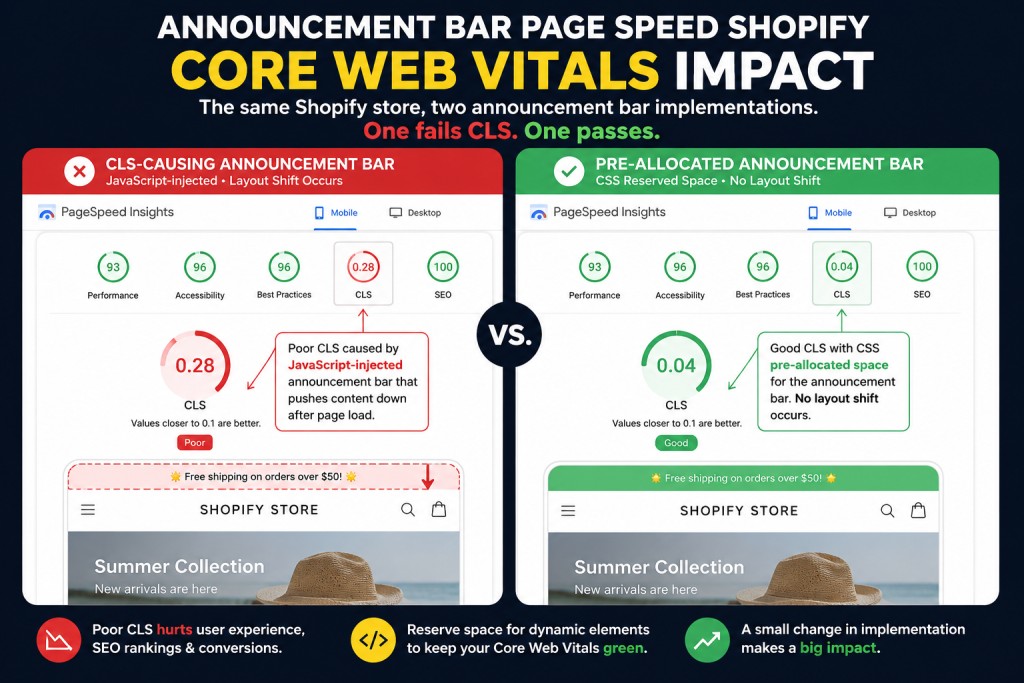
Announcement bar page speed on Shopify is a problem most merchants discover too late — after their Core Web Vitals score has already failed and Google has quietly reduced their organic visibility. Your bar is one of the first things a visitor sees when they land on your store, but it is also one of the most common sources of a failing CLS score. Cumulative Layout Shift measures how much the page visually jumps during load.
According to Shopify’s official Core Web Vitals guidance, announcement bars that load via JavaScript after the page has started rendering are among the leading causes of CLS on Shopify stores. The bar pushes all content below it downward when it appears, and Google records that shift.
EaseNotify is a website notification and announcement bar tool for Shopify and web businesses. We built it around the constraint that a bar that costs you conversions through page speed is not worth the conversions it generates. This guide covers announcement bar page speed for Shopify store owners who want to keep their bar and pass Core Web Vitals — not choose between the two.
Key Takeaways
- Announcement bar page speed on Shopify has two separate problems: CLS and script weight. Most bars cause CLS — but the bar itself is not the problem. How it loads is. A bar included in the initial HTML with reserved height causes zero layout shift. A bar injected by a JavaScript snippet after page load will push all content down and trigger a CLS penalty.
- Third-party app scripts add 200 to 500 milliseconds per app. According to thunderpagespeed.com’s 2026 Shopify app audit, the cumulative effect of multiple apps can add 2 to 5 seconds to load time. Each second costs you approximately 4.42 percent of conversions according to Portent’s site speed research.
- Script weight is the second issue. Google recommends individual JavaScript bundles stay under 16KB. Many announcement bar apps load scripts well above this threshold before the bar has even rendered.
- Shopify’s native announcement bar causes zero CLS because it is baked into the theme HTML. The tradeoff is that it offers zero targeting, scheduling, or conversion features. See our comparison of the best announcement bar tools for Shopify to understand what you give up and what you gain with each option.
- You can diagnose your bar’s CLS impact in five minutes using Google PageSpeed Insights or Chrome DevTools — no technical knowledge needed.
The 5 Warning Signs Your Announcement Bar Page Speed on Shopify Has a Problem
Before you can fix announcement bar page speed on your Shopify store, you need to know what you are looking for. Google uses three Core Web Vitals to measure page experience. Two of them are directly affected by announcement bar implementation. Here are the 5 warning signs that your bar is the cause.
| Core Web Vital | What It Measures | Announcement Bar Impact | Good Score |
|---|---|---|---|
| Cumulative Layout Shift (CLS) | How much visible content shifts during load | High — JS-injected bars push all content down | Under 0.10 |
| Largest Contentful Paint (LCP) | How fast the largest visible element loads | Medium — heavy scripts delay LCP | Under 2.5 seconds |
| Interaction to Next Paint (INP) | How fast the page responds to user input | Low — only affects bars with interactive JS | Under 200ms |
CLS is the primary concern for announcement bar page speed on Shopify. Google’s threshold for a passing score is 0.10. Announcement bars injected via third-party JavaScript routinely push scores to 0.20 to 0.35, putting stores in the “Needs Improvement” or “Poor” range.
Warning sign 1: Your CLS score is above 0.10 and your bar app is listed under “Avoid large layout shifts” in PageSpeed Insights.
Warning sign 2: Your bar app’s domain appears under “Reduce unused JavaScript.”
Warning sign 3: Your PageSpeed score improves when you temporarily disable the bar app.
Warning sign 4: Your bar app loads more than one JavaScript file on page load.
Warning sign 5: You installed the bar app and your LCP degraded by more than 200ms.
A failing CLS score has direct business consequences. Google uses Core Web Vitals as a ranking signal in its Page Experience algorithm. A poor score reduces organic visibility, meaning the same ad spend brings fewer visitors to your store.
How Announcement Bars Cause CLS (The Most Common Problem)
How Announcement Bars Cause CLS (The Most Common Problem)
The CLS problem with announcement bars comes down to load order. When a visitor hits your store, the browser starts rendering the page from the top of the HTML. If your announcement bar is included in that initial HTML with a fixed height — the way Shopify’s native bar works — the browser reserves that space before anything else loads. No shift occurs.
The problem arises when an announcement bar is loaded by a third-party app. App scripts typically load after the page has started rendering, because Shopify defers third-party JavaScript to protect performance. When the script fires, the bar appears at the top of the viewport and the browser has to push all existing content down to make room. The visitor sees everything jump. Google records the shift and assigns a CLS score.
This is not a hypothetical issue. The Shopify Community thread titled Announcement Bar Loading Is Causing Cumulative Layout Shift (CLS) Issues has been active for years and reflects a pattern that affects merchants across all themes and bar apps.
The technical fix, if you are comfortable editing theme code, is to add a CSS container with a fixed height that reserves space for the bar before the script loads:
.announcement-bar-wrapper {
  min-height: 46px; /* match your bar's actual height */
  width: 100%;
}
This tells the browser to hold that space even before the bar script fires, so no visible shift occurs when the content loads. The bar fills reserved space instead of pushing content that is already on screen.
If you are not comfortable editing theme code, the cleanest solution is to use a bar tool that handles CLS natively. Our roundup covers which apps pre-allocate height by default and which do not.
Script Weight: The Hidden Announcement Bar Page Speed Problem Shopify Merchants Miss
CLS is the visible problem. Script weight is the invisible one.
Every app you install on your Shopify store adds JavaScript that loads on every page visit. Thunderpagespeed.com’s 2026 Shopify app performance audit found that third-party scripts account for 62 percent of total JavaScript on the average Shopify store. Each installed app adds 200 to 500 milliseconds of load time in isolation. With ten apps installed — a conservative count for an active Shopify store — third-party script overhead alone can total 2 to 5 seconds.
Google recommends individual JavaScript bundles stay under 16KB. Many announcement bar apps exceed this. A 140KB script loading on every page visit just to display a text banner at the top of your store is a measurable conversion drag before a single shopper has read the message.
The practical impact: if your bar adds 300ms of load time and your store converts at 2.0 percent, Portent’s research suggests that 300ms costs you roughly 1.3 percent in conversions — meaning your actual conversion rate from that traffic pool is effectively 1.97 percent rather than 2.0 percent. Small per visit. Significant at scale across 100,000 monthly sessions.
How to Audit Announcement Bar Page Speed on Your Shopify Store in 5 Minutes
You do not need a developer to check announcement bar page speed on Shopify. Here is how to run the full audit in five minutes using two free tools.
Method 1: Google PageSpeed Insights
- Go to pagespeed.web.dev and enter your store’s homepage URL.
- Run the mobile analysis (mobile is the critical measurement since over 70 percent of Shopify traffic is mobile).
- Scroll to the “Diagnostics” section and look for “Avoid large layout shifts.”
- If your announcement bar appears in the list of elements causing layout shift, the bar is your CLS source.
- Check “Reduce unused JavaScript” in the same section. If you see your bar app’s script domain in the list, that is your script weight problem.
Method 2: Chrome DevTools (faster for CLS)
- Open your store in Chrome and press F12 to open DevTools.
- Go to the “Performance” tab and click the record button, then reload the page.
- In the timeline, look for red markers labeled “Layout Shift.” Hover each one to see which element caused it.
- If the shifted element is your announcement bar container, the diagnosis is confirmed.
| Diagnosis Result | What It Means | Fix |
|---|---|---|
| CLS score above 0.10, bar listed as cause | Bar is loading via JS after page render | Pre-allocate CSS height or switch to a native bar tool |
| CLS score below 0.10, bar not listed | Bar is not causing layout shift | No action needed |
| Large unused JavaScript from bar app domain | App script is heavier than it needs to be | Evaluate lighter alternatives |
| Bar does not appear in either audit | Bar is likely rendered in initial HTML | No action needed |
What Good Announcement Bar Page Speed on Shopify Actually Looks Like
A speed-safe bar is what announcement bar page speed compliance on Shopify looks like in practice. It does three things differently from a typical app-injected bar.
1. Height is pre-allocated before the script loads. The page reserves the exact pixel height of the bar in the initial CSS, so there is nothing to shift when the bar appears. A fixed-height container of 40 to 48 pixels added to the theme’s stylesheet removes CLS before it starts.
2. The script is small. A bar that displays text, a countdown, and a CTA button does not require a heavy JavaScript library. According to scaleshopify.com’s CLS reduction guidance, keeping announcement bar scripts under 16KB is achievable and the correct standard to hold any bar app to. Ask your app provider for their script weight. If they cannot answer, that is a signal.
3. The bar does not block rendering. Scripts that load synchronously in the document head block the browser from rendering anything else until the script completes. A well-implemented bar loads its script asynchronously or deferred, allowing the rest of the page to render in parallel.
The practical test: load your store with your announcement bar active, then load it again with the bar app temporarily disabled. If your PageSpeed score improves meaningfully with the bar off, the implementation is the problem, not the concept.
The Announcement Bar Speed-Safety Checklist
Before choosing or keeping an announcement bar app for your Shopify store, run it through this checklist:
| Check | What to Look For | How to Verify |
|---|---|---|
| CLS impact | CLS score below 0.10 with bar active | Google PageSpeed Insights |
| Script weight | Under 16KB for the bar’s primary script | Chrome DevTools > Network tab, filter by JS |
| Load method | Script loads async or deferred, not synchronously | Chrome DevTools > Sources tab |
| Height reservation | CSS container with fixed height exists before bar loads | View page source, look for bar wrapper styles |
| Mobile render | Bar renders within correct pixel height on 375px viewport | Chrome DevTools device emulation |
| No render-blocking CSS | Bar stylesheet does not block first paint | PageSpeed Insights “Eliminate render-blocking resources” |
A bar that passes all six checks can be safely installed without measurable page speed regression.
How EaseNotify Handles This
EaseNotify is built around the constraint that a notification bar should add revenue, not subtract it from page speed. The Scheduling Widget, Page Targeting, and Sticky Widget features are designed to run without the script overhead that makes most third-party bars a performance liability.
Page Targeting means you can show relevant bars only on the pages where they drive action — a free shipping bar on collection and product pages, a countdown timer on the cart page — rather than loading a script across every URL on your store. This reduces the number of page loads where the script runs, which limits its cumulative impact on your store’s performance budget.
If you have a bar running now and want to check whether it is causing CLS, run the five-minute PageSpeed Insights audit above. If the bar is listed as a CLS source, start your free EaseNotify plan at easenotify.com and test with the same audit tool after switching.
Frequently Asked Questions (FAQs)
Q: Does adding an announcement bar always hurt Shopify page speed? No. An announcement bar included in your theme’s initial HTML with reserved CSS height causes no CLS and no meaningful speed impact. The performance problem is specific to bars loaded via third-party JavaScript that fires after page rendering begins.
Q: What CLS score should I aim for with an announcement bar installed? Google’s threshold for a passing CLS score is 0.10 or below. Aim for under 0.05 to leave room for other potential layout shifts on the page, such as late-loading images or web fonts. If your bar app pushes your score above 0.10, the implementation needs to change before the bar generates net positive results.
Q: How do I check the script weight of my announcement bar app? Open Chrome DevTools (F12), go to the Network tab, filter by JS, and reload your page. Look for script files from your bar app’s domain and check the Size column. Any individual script file above 16KB is worth flagging. If you see multiple script files from the same app, add them together.
Q: My Shopify theme already has a built-in announcement bar. Should I use that instead of an app? For page speed, the native theme bar is the safest option because it loads in the initial HTML. The tradeoff is functionality: native bars typically support one static message with no scheduling, page targeting, countdown timers, or performance analytics. If you need those features, a well-implemented app bar with CSS height reservation is the correct approach.
Q: Can I have an announcement bar and still pass Google’s Core Web Vitals? Yes. A bar that pre-allocates its height, loads its script asynchronously, and keeps its script under 16KB will not cause a failing CWV score. The key is to audit after installation, not before. Run Google PageSpeed Insights with the bar active and use the results as your baseline, not a guess.
Q: What is the conversion cost of a slow announcement bar? Each additional second of load time reduces conversions by approximately 4.42 percent according to Portent’s site speed research. A bar that adds 300 milliseconds of load time reduces your effective conversion rate by just over 1 percent of your current rate. Across a store doing 50,000 monthly sessions at 2.0 percent conversion, that is roughly 13 lost transactions per month from the load time alone — before accounting for any CLS ranking penalty.
Start your free EaseNotify plan at easenotify.com. The Page Targeting feature limits bar script execution to the pages where it drives action, and every EaseNotify bar is designed to pass the speed-safety checklist above out of the box.
1 thought on “Announcement Bar Page Speed on Shopify: 5 Warning Signs Your Bar Is Failing Core Web Vitals”